

- About

Getting to know us
- Industries
Industries
McMaster University: Exadata Cloud@Customer Case Study

Eclipsys has helped McMaster University maximize its investment in the Oracle Exadata Cloud@Customer solution. Read the story here
- Careers









Life at DSP-Eclipsys
- Contact Us
Locking Down OCI Object Storage with PSA, ZPR and IAM Deny
Contents
The Problem: A Valid Key Is Enough
In a default OCI setup, anyone holding a valid API key can read an Object Storage bucket from any network path: inside the VCN, through a Service Gateway, or from a laptop on the internet. This blog shows how three controls, layered one at a time, make a stolen key useless everywhere except the one approved path.
-
Private Service Access (PSA) gives the Object Storage API a private IP inside the VCN, with no application changes.
-
Zero Trust Packet Routing (ZPR) decides which workloads may use that private IP.
-
IAM Deny rejects any request that did not arrive through the PSA endpoint, even with valid credentials.
Who Should Care
This setup is worth your time if any of these apply:
-
You store sensitive data in Object Storage. Database backups (RMAN, ZDM staging, Data Pump exports), financial reports and customer data are high-value targets, and a leaked API key or config file is a common way in.
-
You work in a regulated industry. Banking, insurance, healthcare and the public sector often must show that data never crosses the public internet and that access is limited to approved systems. This lab produces that evidence.
-
You already use a Service Gateway and assume that is enough. A Service Gateway keeps traffic off the internet, but it does nothing to stop someone from using the same key from elsewhere.
-
You need defence in depth that survives mistakes. Each layer catches what the previous one misses, so one misconfigured NSG, route table or DNS entry does not expose the data.
The cost is low: the PSA endpoint in this lab was marked Always Free in the console, and ZPR and IAM Deny are configuration, not infrastructure resources that incur cost.
Every result below comes from CLI output or console screenshots captured during the lab setup.
Lab Setup
The lab uses one VCN with two subnets, three VMs, and one bucket. The same API key is installed on three machines (Private-VM, Public-VM2, and my Laptop) to simulate compromised credentials.
| Machine | Subnet | Private IP | Role in the lab |
| Private-VM | Private (10.0.1.0/24) | 10.0.1.14 | Legitimate reporting server |
| Public-VM1 | Public (10.0.0.0/24) | 10.0.0.74 | Jump host, holds no credentials |
| Public-VM2 | Public (10.0.0.0/24) | 10.0.0.204 | Compromised host inside the VCN |
| Laptop | Internet | — | Attacker with the stolen key |
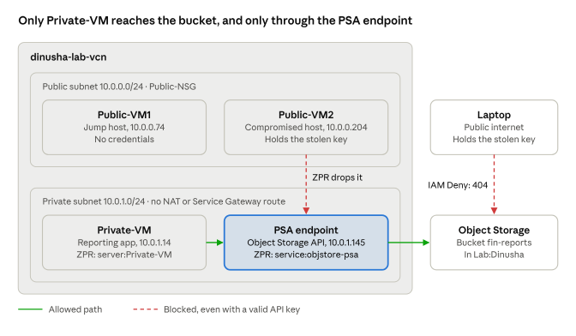
Lab architecture · final state with PSA, ZPR and IAM Deny
In the final state, the only working path runs from Private-VM through the PSA endpoint. Public-VM2 is also stopped by IAM Deny when it bypasses PSA with its own DNS entry (Phase 4).
Security lists are empty; NSGs control all traffic. The bucket fin-reports lives in compartment Lab:Dinusha. A dedicated, non-admin user, psa-lab-user, in group PSA-Lab-Users gets this allow policy:
Allow group PSA-Lab-Users to read buckets in compartment Lab:DinushaAllow group PSA-Lab-Users to manage objects in compartment Lab:Dinusha where target.bucket.name='fin-reports'Allow group PSA-Lab-Users to read objectstorage-namespaces in tenancy
Note: The test user must not be an administrator. Default administrators are exempt from deny policies; therefore, an admin test would hide the result of Phase 4.
Phase 1: Baseline, Any Key and Any Path Works
With no extra controls, all three machines listed and wrote to the bucket, and all three resolved Object Storage to the same public IP.
$ dig +short objectstorage.ca-toronto-1.oraclecloud.comobjectstorage.ca-toronto-1.oci.oraclecloud.com.134.70.72.3
-
Private-VM reached the bucket through the Service Gateway because its route to "All YYZ Services" is more specific than the NAT default route.
-
Public-VM2 reached it through the Internet Gateway.
-
The laptop reached it over the public internet.


The CLI's debug output showed it calls https://objectstorage.ca-toronto-1.oraclecloud.com. That is the name PSA must take over in Phase 2.
Phase 2: Private Service Access
After creating a PSA endpoint for the Object Storage API, every VM in the VCN resolved Object Storage to a private IP, 10.0.1.145, with no application change.
Setup:
-
Create
PSA-NSGwith ingress TCP 443 fromPrivate-NSGand fromPublic-NSG. Allowing Public-NSG is deliberate: in Phase 3 it proves ZPR, not the NSG, blocks the compromised host. -
Add egress TCP 443 to
PSA-NSGon Public-NSG. Private-NSG already allows egress 443. -
In the VCN, open Private Service Access, create an endpoint for Object Storage in the private subnet, and attach
PSA-NSG.
Result on Both VMs:
$ dig +short objectstorage.ca-toronto-1.oraclecloud.com10.0.1.145$ curl -sv -m 10 -o /dev/null https://objectstorage.ca-toronto-1.oraclecloud.com 2>&1 | grep -E "Trying|Connected"* Trying 10.0.1.145:443...* Connected to objectstorage.ca-toronto-1.oraclecloud.com (10.0.1.145) port 443 (#0)
Which names PSA overrides. The endpoint's details page lists the FQDNs it maps to its private IP: the regional objectstorage, compat and swiftobjectstorage names, plus wildcard namespace-specific names under *.objectstorage.ca-toronto-1.oci.customer-oci.com. The CNAME target objectstorage.ca-toronto-1.oci.oraclecloud.com is not on the list and still resolves to 134.70.72.3. That name is not a usable API endpoint, though: the certificate served at that IP does not match it, so the CLI's TLS check fails.
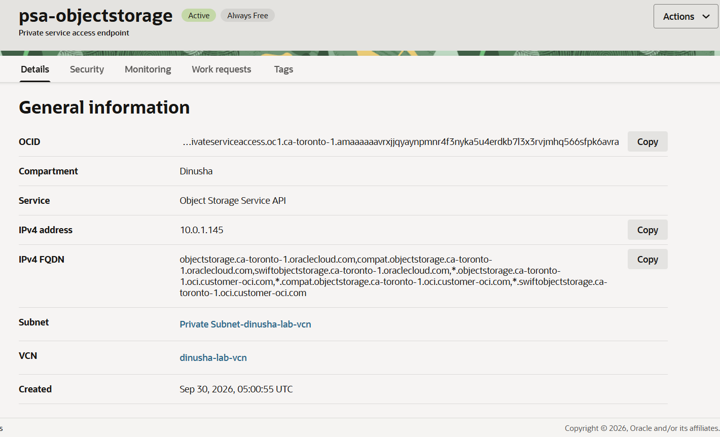
The PSA endpoint: private IP 10.0.1.145 and the list of Object Storage names mapped to it.
No public path left. I then deleted both routes (NAT and Service Gateway) from the private subnet's route table. Private-VM still listed the bucket through PSA, while curl https://www.oracle.com timed out.
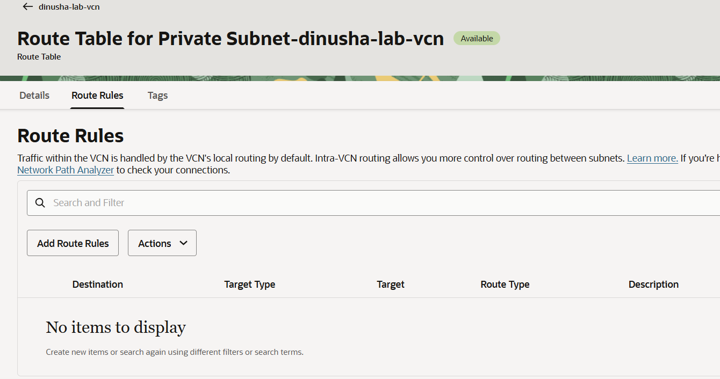
The private subnet's route table after removing the NAT and Service Gateway routes.
PSA on its own is not an access control, though. Public-VM2 also listed the bucket through 10.0.1.145, and the laptop was unaffected because PSA only changes DNS inside the VCN. Oracle's PSA documentation also states the Object Storage endpoint blocks cross-tenancy pre-authenticated requests, foreign credentials, and anonymous access; However, I did not test those.
Phase 3: ZPR on the PSA Endpoint
With one ZPR statement, Public-VM2 could no longer reach the PSA endpoint, even though its NSG allowed the traffic, its DNS pointed at 10.0.1.145, and it held a valid key.
Write the statements before tagging anything. Once a resource carries a security attribute, only flows a ZPR policy allows can reach it. Tagging first cuts access immediately.
in ZPR-Demo.network:dinusha-lab-vcn VCN allow ZPR-Demo.server:Private-VM endpoints to connect to ZPR-Demo.service:objstore-psa endpoints with protocol='tcp/443'in ZPR-Demo.network:dinusha-lab-vcn VCN allow '10.0.0.74/32' to connect to ZPR-Demo.server:Private-VM endpoints with protocol='tcp/22'
The second statement keeps SSH from the untagged jump host working, using a CIDR source. Then tag, in order: the VCN (network:dinusha-lab-vcn), Private-VM (server:Private-VM), and the PSA endpoint (service:objstore-psa). Allow about five minutes for the change to apply.
Result on Public-VM2:
$ dig +short objectstorage.ca-toronto-1.oraclecloud.com
10.0.1.145
$ curl -sv -m 10 -o /dev/null https://objectstorage.ca-toronto-1.oraclecloud.com 2>&1 | grep -E "Trying|Connected|timed out"
*   Trying 10.0.1.145:443...
* Connection timed out after 10000 milliseconds
$ oci os object list -bn fin-reports --profile psalab --namespace yza00k7tuks0 --no-retry --connection-timeout 10
ConnectTimeout: "The connection to endpoint timed out"
Without --namespace, the CLI fails earlier with "Unable to retrieve namespace internally" because its namespace lookup travels the same blocked path. To the attacker, the service does not respond. Private-VM, meanwhile, kept listing the bucket normally.
Phase 4: IAM Deny Closes the Remaining Paths
PSA and ZPR still left two paths open: the laptop on the internet, and a compromised VM that overrides its own DNS. An IAM deny policy closed both, while Private-VM kept working.
Warning: enabling IAM deny policies is permanent. Oracle's deny policy documentation states this explicitly. Get approval from the tenancy owner before you enable it.
The DNS Bypass
A host that controls its own DNS can skip PSA while keeping the valid hostname, so TLS still passes. On Public-VM2, with temporary egress to the internet:
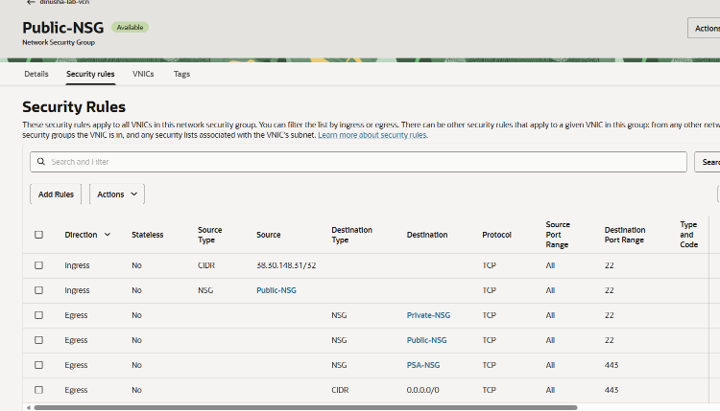
Public-NSG during the bypass test. The last rule, egress TCP 443 to 0.0.0.0/0, was temporary and removed afterwards.
After adding the temporary egress rule, I added a host entry to bypass DNS.
$ echo "134.70.72.3 objectstorage.ca-toronto-1.oraclecloud.com" | sudo tee -a /etc/hosts$ oci os object list -bn fin-reports --profile psalab --namespace yza00k7tuks0 --no-retry --connection-timeout 10{ "data": [ ...all four objects... ] }
The request left through the Internet Gateway to the public IP. ZPR did not apply because the untagged VM was not talking to the tagged PSA endpoint.
The Deny Policy
After enabling deny policies under Identity & Security → Policies, I created this statement in the root compartment:
Deny any-user to inspect object-family in compartment Lab:Dinusha where any {not request.gateway.id, request.gateway.type != 'privateserviceaccess'}
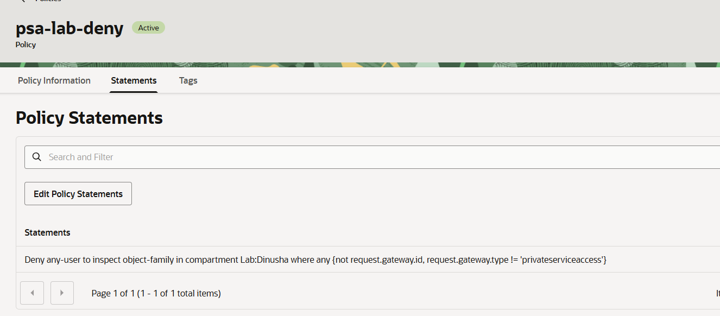
The policy editor accepted request.gateway.type, the form used in Oracle's PSA launch blog. Oracle's Common Policies page shows request.gatewaytype instead.
Result. The laptop and the DNS bypass on Public-VM2 both returned the same error, while Private-VM still listed the bucket through PSA:
"code": "BucketNotFound","message": "Either the bucket named 'fin-reports' does not exist in the namespace 'yza00k7tuks0' or you are not authorized to access it","status": 404
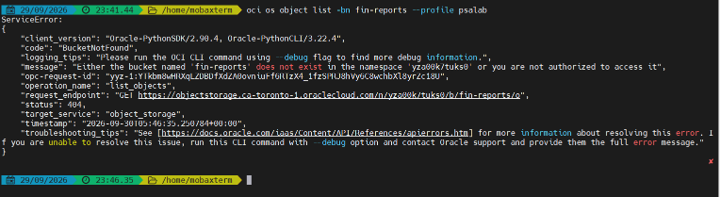
The laptop, with the same valid key, after the deny policy.
Object Storage reports the denial as "not found", so the attacker cannot confirm the bucket exists. The namespace stayed readable because namespace read is granted at tenancy level while the deny is scoped to the compartment. In the console, psa-lab-user could not load the Dinusha buckets page (NamespaceNotFound), while my administrator account still could.
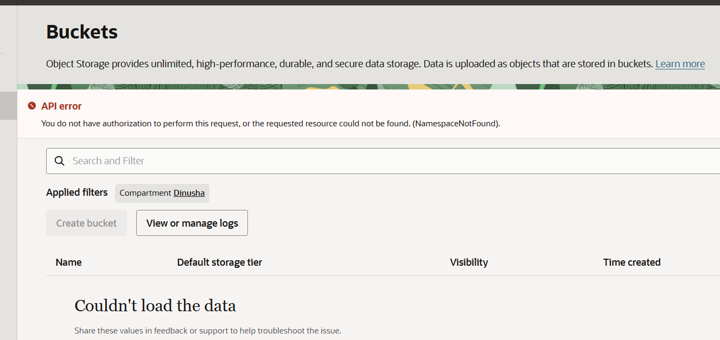
Console as psa-lab-user: the Dinusha buckets page cannot load.
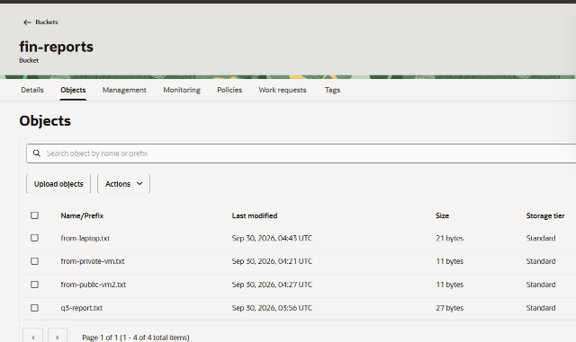
Console as a default administrator: the same bucket and objects load, because default administrators are exempt from deny policies.
Pinning To One PSA Endpoint, and the Pitfall
The PSA launch blog notes that a deny policy can restrict access to one specific PSA endpoint. My first attempt replaced the whole condition:
Deny any-user to inspect object-family in compartment Lab:Dinusha where request.gateway.id != '<PSA OCID>'
With this version, the laptop and the console could read the bucket again. Requests from the internet carry no request.gateway.id, so the condition evaluated to false and the deny did not apply. Keeping the no-gateway check fixed it:
Deny any-user to inspect object-family in compartment Lab:Dinusha where any {not request.gateway.id, request.gateway.id != '<PSA OCID>'}
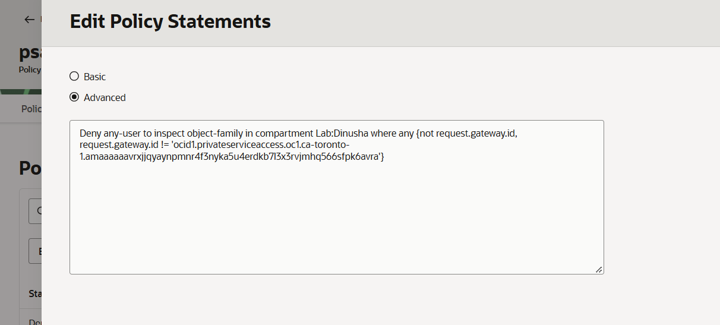
The corrected, pinned statement in the policy editor.
After this change, the laptop returned 404, Public-VM2 timed out at ZPR, and Private-VM kept working.
Evidence Matrix
Each control stopped a different attack, and only the legitimate path survived all three. Every row used the same valid API key.
| Attempt | Baseline | +PSA | +ZPR | +IAM Deny |
| Private-VM (legitimate) |
Works, via Service Gateway |
Works, via 10.0.1.145 |
Works | Works |
| Public-VM2, normal DNS |
Works, via Internet Gateway |
Works, via 10.0.1.145 |
Timeout (ZPR) |
Timeout |
|
Public-VM2, |
— | — | Works | 404 (IAM Deny) |
| Laptop, internet | Works | Works | Works | 404 (IAM Deny) |
| Console as psa-lab-user |
— | — | — | Could not load |
| Console as administrator |
— | — | — | Works (exempt) |
Lessons Learned
-
PSA changes the path, not the permissions. Any VM that can reach the PSA IP can use it. Pair it with NSGs or ZPR.
-
ZPR stops lateral movement, but not a host that routes around it. A compromised VM that edits
/etc/hostsand has internet egress skips the tagged endpoint entirely. -
IAM Deny is the layer that follows the credential. It rejected the stolen key on every path except the PSA endpoint.
-
Write ZPR policies before applying attributes; tagging first cuts traffic immediately.
-
In a deny condition, a missing variable evaluates to false. Always keep
not request.gateway.idalongside anyrequest.gateway.*check, or internet requests slip through. -
Test deny policies as a non-admin user. Default administrators are exempt and will conclude the policy does not work.
-
Expect 404, not 403. Object Storage reports a denial as "bucket not found".
For more information, check out our Oracle Cloud Infrastructure, or contact us today, and one of our experts will be in touch.