

- About

Getting to know us
- Industries
Industries
McMaster University: Exadata Cloud@Customer Case Study

Eclipsys has helped McMaster University maximize its investment in the Oracle Exadata Cloud@Customer solution. Read the story here
- Careers







Life at DSP-Eclipsys
- Contact Us
Resolving Veeam Plug-in Issues for RMAN on Exadata Cloud@Customer
Contents
When managing Oracle RMAN backups on Exadata Cloud@Customer (ExaCC) using the Veeam Plug-in for Oracle RMAN, authentication failures, expired credentials, or missing repository settings can cause backup jobs to fail silently or throw connection errors.
In this guide, I will walk you through diagnosing, re-authenticating, and verifying the configuration of VeeamPluginforOracleRMAN using command-line administration.
Problem Overview
During routine operations or after plugin upgrades (such as updating to VeeamPluginforOracleRMAN-12.3.x), RMAN backup jobs may fail to communicate with the Veeam Backup & Replication repository. Common root causes include:
-
Service account password updates on the Veeam server.
-
Stale authentication tokens or configuration drift after plugin updates.
-
Incomplete setup wizard configuration.
Step 1: Navigate to the Plugin Directory
Log in as root (or a privileged user) on your ExaCC database node VM:
$ sudo su - root
cd /opt/veeam/VeeamPluginforOracleRMAN

Step 2: Inspect Current Configuration & Status
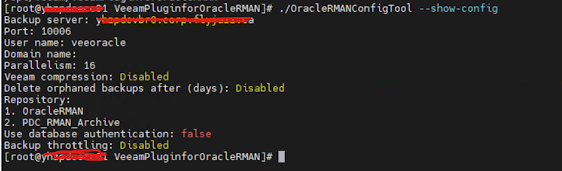
$ ./OracleRMANConfigTool --show-config
$ cd /home/oracle/local/obackup/DBNAME
$ grep -n -C 2 -iE "ORA-19511|RMAN-03009|failed"
The RMAN log file had ORA-19511 & RMAN-03009 errors, and the backups were not running.


Step 3: Update Veeam Plugin Credentials
If the error stems from credential mismatch or password updates, reset the stored credentials using OracleRMANConfigTool. Run the following command, passing your Veeam username and updated password.
$./OracleRMANConfigTool --set-credentials "veeoracle" "YourNewPassword"

Step 4: Run the Interactive Configuration Wizard (If needed)
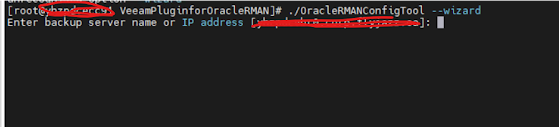
If updating credentials alone does not resolve the issue, or if the repository association is broken, re-run the interactive wizard to re-register the plugin with your Veeam Backup Server.

Step 5: Verify the Configuration
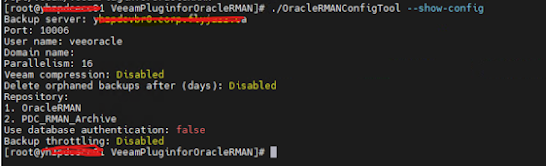
After reapplying credentials and settings, verify that the configuration tool shows an active, authenticated status. Run the RMAN backup again and check the current RMAN logs.
$ ./OracleRMANConfigTool --show-config
$ cd /home/oracle/local/obackup/DBNAME
$ grep -n -C 2 -iE "ORA-19511|RMAN-03009|failed"
Check out our Oracle Exadata Services here, or contact us today for more information and one of our experts will be in touch.