

- About

Getting to know us
- Industries
Industries
McMaster University: Exadata Cloud@Customer Case Study

Eclipsys has helped McMaster University maximize its investment in the Oracle Exadata Cloud@Customer solution. Read the story here
- Careers









Life at DSP-Eclipsys
- Contact Us
Oracle AutoUpgrade for Patching: Staying Ahead of CSPU and CPU Cycles
Contents
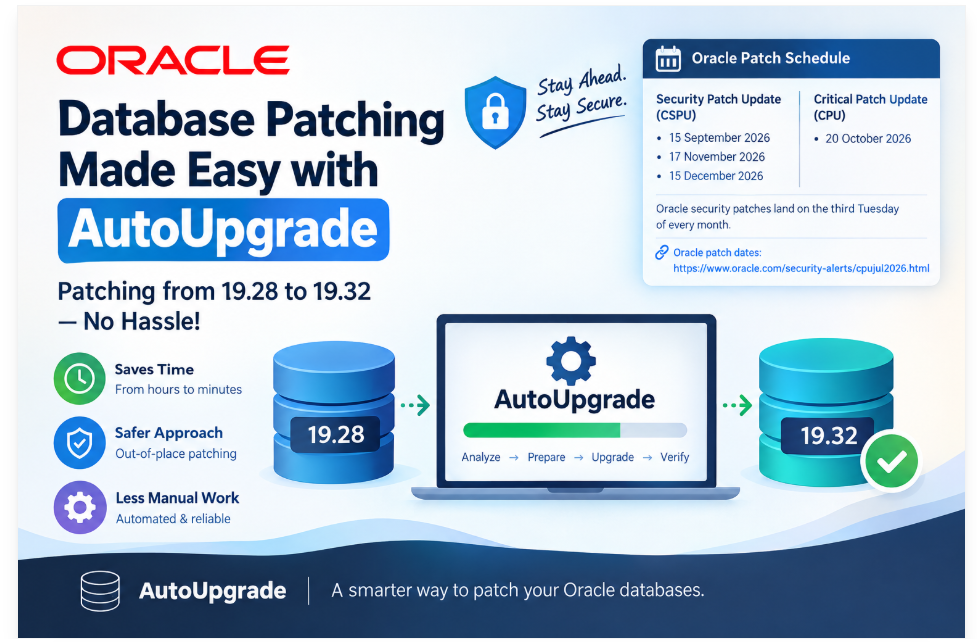
Introduction
AI has compressed the time everything takes. Tasks that used to fill a morning now finish in minutes, freeing us to build the next automation and keep things moving. But the same shift happened on the other side of the fence. Attackers who once struggled to write a working script now have the same leverage we do. Everything is at your fingertips, for better and for worse.
That makes keeping systems patched more important than ever. I live in the Oracle ecosystem, and I’d argue database patches sit at the top of that list. Oracle has also changed the rhythm: we now have quarterly Critical Patch Updates (CPU) alongside monthly Security Patch Updates (CSPU).
Oracle patching dates: https://www.oracle.com/security-alerts/cpujul2026.html
Oracle security patches land on the third Tuesday of every month. The next dates are:
-
15 September 2026 (CSPU)
-
20 October 2026 (CPU)
-
17 November 2026 (CSPU)
-
15 December 2026 (CSPU)
Staying ahead of that calendar is not easy. Download, apply, test, repeat – every month. So I went looking for a model that would let me be proactive instead of reactive and cut the time each cycle costs me.
I found it almost by accident. While installing an Oracle Database 26ai home, I got a proper taste of AutoUpgrade, and I’ve been sold on it ever since. The time AutoUpgrade saves on database patching is real.
In this blog, I’ll walk through patching from 19.28 to 19.32 without any hassle.
AutoUpgrade patching is an out-of-place method, so it’s a safe way to patch.
Step 1: Download the AutoUpgrade Tool
Grab the latest AutoUpgrade tool from MOS Doc 2485457.1. Always take the newest build. It’s backward compatible, and the patching features have been moving fast.
To validate, check the AutoUpgrade tool version.
|
|
Step 2: Set Up Your Directory Structure
I recommend creating a directory structure like the one below and moving the latest AutoUpgrade tool into it. Keeping the keystore, patches, and logs separated makes the whole thing much easier to troubleshoot later.
mkdir -p /u01/Stage/autoupgrade/PATCHING_19.32cd /u01/Stage/autoupgrade/PATCHING_19.32mkdir keystore patches logs |
This is how it looks after creation:
|
|
Step 3: Build the Config File
Everything AutoUpgrade needs lives in one file. No wrappers, no response files, no long command lines to get wrong at two in the morning. You write the config once, and it becomes the record of exactly what you patched and where.
Mine sits alongside the rest of the staging area as patch_19_32.cfg:
|
|
Step 4: Load Your My Oracle Support Credentials
AutoUpgrade downloads the patches for you, so it needs your MOS credentials and CSI number. Those go into an encrypted keystore rather than sitting in the config file in plain text:
|
|
Step 5: Download the Patches
Ask any DBA where the time actually goes in a patch cycle, and you’ll get the same answer. It isn’t the apply. It’s the hunt. Logging into My Oracle Support, working out which RU you need, then which OJVM goes with it, then whether there’s a Data Pump bundle this quarter, then chasing the right OPatch version – and doing all of it again for the next platform. Half a day gone before you’ve touched a database.
That whole exercise is now one command:
java -jar autoupgrade_26.5.260807.jar -patch -config patch_19_32.cfg -mode download |
AutoUpgrade reads the patch line from your config, works out what that actually resolves to, and pulls it down for you.
One thing that will stop you cold: you need your CSI number registered in the keystore. Without a valid Customer Support Identifier, the gold image request fails – you’ll get the regular patches from MOS and nothing else. Set the keystore up before you run this, not after.
Here’s the run:
|
|
Step 6: Analyze Before You Touch Anything
I never skip this. Analyze is a read-only pass; it inspects the databases, checks the staged patches, and tells you what it plans to do without doing any of it. It’s the cheapest ten minutes in the whole cycle. If something is going to bite you, it usually shows up here rather than three hours into a Saturday night change window.
What I’m specifically looking for: errors it can’t resolve, and any one-off patches sitting in the source home that will need rolling back before the new home can go in. Finding a conflicting one-off during analyze is a scheduling conversation. Finding it during apply is an incident.
java -jar autoupgrade_26.5.260807.jar -patch -config patch_19_32.cfg -mode analyze |
Same jar, same config, different mode. That’s the pattern for the whole tool.
[oracle@db-pri PATCHING_19.32]$ java -jar autoupgrade_26.5.260807.jar -patch -config patch_19_32.cfg -mode analyzeAutoUpgrade Patching 26.5.260807 launched with default internal optionsProcessing config file ...Loading AutoUpgrade Patching keystoreAutoUpgrade Patching keystore is loadedAutoUpgrade Patching adds the MRP and OCW options to the PATCH configuration parameter because the generated Gold Image always includes those fixes.Connected to Oracle Update Advisor service |- Requesting Gold ImagesAutoUpgrade Patching has finished processing the Gold Image requestsConnected to MOS - Searching for specified patches------------------------------------------------------------------Downloading files to /u01/Stage/autoupgrade/PATCHING_19.32/patches------------------------------------------------------------------OPatch 12.2.0.1.52 for DB 19.0.0.0.0 (Aug 2026) File: p6880880_190000_Linux-x86-64.zip - LOCATEDOJVM RELEASE UPDATE 19.32.0.0.0 File: p39222882_190000_Linux-x86-64.zip - LOCATEDDATAPUMP BUNDLE PATCH 19.32.0.0.0 File: p39657094_1932000DBRU_Generic.zip - LOCATEDJDK BUNDLE PATCH 19.0.0.0.260818 File: p39791916_190000_Linux-x86-64.zip - LOCATEDGold Image - 19.32 File: db_goldimage_19_32_20260901144222.zip - LOCATED------------------------------------------------------------------+-----------------------------------------+| Starting AutoUpgrade Patching execution |+-----------------------------------------+1 CDB(s) plus 2 PDB(s) will be analyzedType 'help' to list console commandspatch> Job 100 completed------------------- Final Summary --------------------Number of databases [ 1 ]Jobs finished [1]Jobs failed [0]Please check the summary report at:/u01/Stage/autoupgrade/PATCHING_19.32/logs/cfgtoollogs/patch/auto/status/status.html/u01/Stage/autoupgrade/PATCHING_19.32/logs/cfgtoollogs/patch/auto/status/status.log[oracle@db-pri PATCHING_19.32]$ |
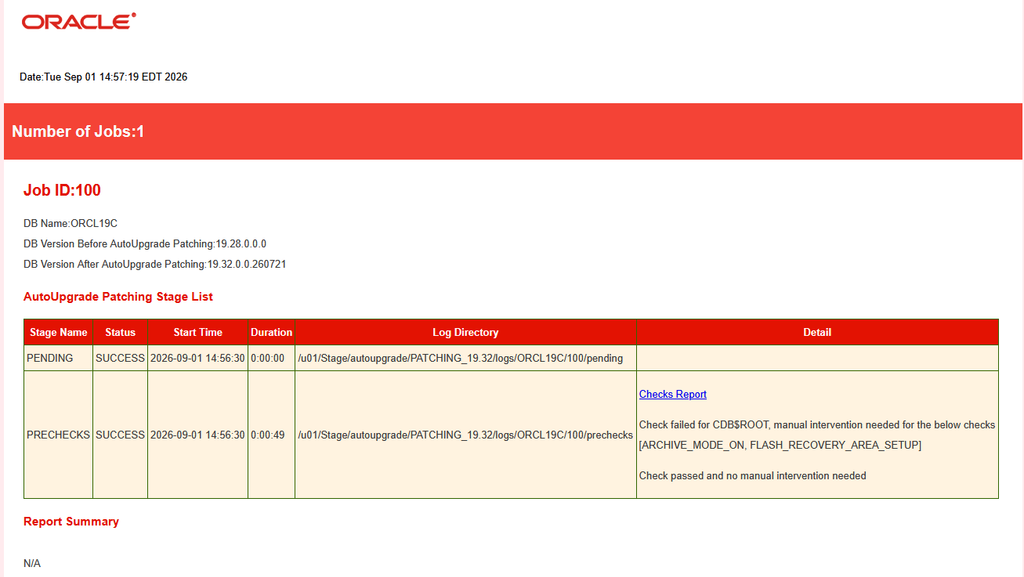
This is how the status.html report looks after analysis:
Step 7: Deploy
Analysis came back clean, so it was time to build the home. This is the bit that sold me. One command creates the new 19c home and patches it to 19.32.
java -jar autoupgrade_26.5.260807.jar -patch -config patch_19_32.cfg -mode create_home |
Once the job kicks off, type lsj -a 30 at the patch prompt, and it’ll refresh the job table every 30 seconds so you can watch it work.

It works through three stages. First, it extracts the gold image. Then it installs the Oracle home:
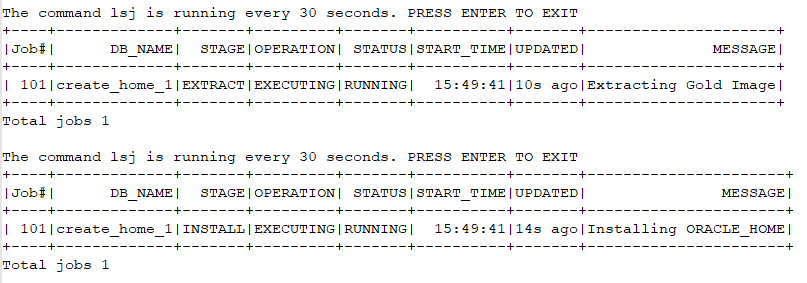
Then it starts patching it:

No manual OPatch calls, no unzipping, no chasing patch order. It was going well.
Then It Broke
The OJVM release update killed it.
[Sep 4, 2026 1:13:51 PM] [INFO] Deleted the file "/u01/app/oracle/product/19.0.0/dbhome_19_32/.patch_storage/patch_unzip/PatchSearch.xml"[Sep 4, 2026 1:13:51 PM] [INFO] --------------------------------------------------------------------------------[Sep 4, 2026 1:13:51 PM] [INFO] The following warnings have occurred during OPatch execution:[Sep 4, 2026 1:13:51 PM] [INFO] 1) OUI-67200:Make failed to invoke "/usr/bin/make -f ins_rdbms.mk javavm_refresh ORACLE_HOME=/u01/app/oracle/product/19.0.0/dbhome_19_32 OPATCH_SESSION=apply"....'Can't locate File/Copy.pm in @INC (you may need to install the File::Copy module) (@INC contains: /u01/app/oracle/product/19.0.0/dbhome_19_32/perl/lib /usr/local/lib64/perl5/5.32 /usr/local/share/perl5/5.32 /usr/lib64/perl5/vendor_perl /usr/share/perl5/vendor_perl /usr/lib64/perl5 /usr/share/perl5) at /u01/app/oracle/product/19.0.0/dbhome_19_32/javavm/install/update_javavm_binaries.pl line 64. BEGIN failed--compilation aborted at /u01/app/oracle/product/19.0.0/dbhome_19_32/javavm/install/update_javavm_binaries.pl line 64. make: *** [ins_rdbms.mk:573: javavm_refresh] Error 2 '[Sep 4, 2026 1:13:51 PM] [INFO] 2) OUI-67124:Re-link fails on target "javavm_refresh".[Sep 4, 2026 1:13:51 PM] [INFO] 3) OUI-67200:Make failed to invoke "/usr/bin/make -f ins_rdbms.mk javavm_refresh ORACLE_HOME=/u01/app/oracle/product/19.0.0/dbhome_19_32 OPATCH_SESSION=apply"....'Can't locate File/Copy.pm in @INC (you may need to install the File::Copy module) (@INC contains: /u01/app/oracle/product/19.0.0/dbhome_19_32/perl/lib /usr/local/lib64/perl5/5.32 /usr/local/share/perl5/5.32 /usr/lib64/perl5/vendor_perl /usr/share/perl5/vendor_perl /usr/lib64/perl5 /usr/share/perl5) at /u01/app/oracle/product/19.0.0/dbhome_19_32/javavm/install/update_javavm_binaries.pl line 64. BEGIN failed--compilation aborted at /u01/app/oracle/product/19.0.0/dbhome_19_32/javavm/install/update_javavm_binaries.pl line 64. make: *** [ins_rdbms.mk:573: javavm_refresh] Error 2 '[Sep 4, 2026 1:13:51 PM] [INFO] 4) OUI-67124: NApply was not able to restore the home. Please invoke the following scripts: - restore.[sh,bat] - make.txt (Unix only) to restore the ORACLE_HOME. They are located under "/u01/app/oracle/product/19.0.0/dbhome_19_32/.patch_storage/NApply/2026-09-04_13-12-03PM"[Sep 4, 2026 1:13:51 PM] [INFO] --------------------------------------------------------------------------------[Sep 4, 2026 1:13:51 PM] [INFO] Finishing UtilSession at Fri Sep 04 13:13:51 EDT 2026[Sep 4, 2026 1:13:51 PM] [INFO] Log file location: /u01/Stage/autoupgrade/PATCHING_19.32/logs/create_home_1/103/opatch/opatch2026-09-04_13-12-03PM_1.log[Sep 4, 2026 1:13:51 PM] [INFO] Stack Description: java.lang.RuntimeException: Re-link fails on target "javavm_refresh". |
My first instinct was that AutoUpgrade had done something wrong. It hadn’t, and I got curious about why a patch would fail specifically at the relinking phase.
The answer is sitting right there in the error.
Can't locate File/Copy.pm in @INC (you may need to install the File::Copy module) |
That’s Perl, not Oracle. The OJVM patch runs a Perl script, update_javavm_binaries.pl, to relink the Java VM binaries, and the system Perl 5.32 on this host didn’t have File::Copy in it. Look at the @INC list in the full error, and you can see it searching every library path and coming up empty.
Solution
Install the missing Perl packages using the command.
dnf install -y perl-File-Copy perl-File-Path perl-File-Compare perl-FindBin perl-lib perl-Data-Dumper perl-Getopt-Long |
Sample output:
[root@db-pri ~]# dnf install -y perl-File-Copy perl-File-Path perl-File-Compare perl-FindBin perl-lib perl-Data-Dumper perl-Getopt-LongLast metadata expiration check: 13:15:05 ago on Fri 04 Sep 2026 12:05:31 AM.Package perl-File-Path-2.18-4.el9.noarch is already installed.Package perl-Data-Dumper-2.174-462.el9.x86_64 is already installed.Package perl-Getopt-Long-1:2.52-4.el9.noarch is already installed.Dependencies resolved.============================================================================================================================================================================================================= Package Architecture Version Repository Size=============================================================================================================================================================================================================Installing: perl-File-Compare noarch 1.100.600-481.1.el9_6 ol9_appstream 12 k perl-File-Copy noarch 2.34-481.1.el9_6 ol9_appstream 19 k perl-FindBin noarch 1.51-481.1.el9_6 ol9_appstream 12 k perl-lib x86_64 0.65-481.1.el9_6 ol9_appstream 13 kTransaction Summary=============================================================================================================================================================================================================Install 4 PackagesTotal size: 56 kInstalled size: 44 kDownloading Packages:[SKIPPED] perl-File-Compare-1.100.600-481.1.el9_6.noarch.rpm: Already downloaded[SKIPPED] perl-File-Copy-2.34-481.1.el9_6.noarch.rpm: Already downloaded[SKIPPED] perl-FindBin-1.51-481.1.el9_6.noarch.rpm: Already downloaded[SKIPPED] perl-lib-0.65-481.1.el9_6.x86_64.rpm: Already downloadedRunning transaction checkTransaction check succeeded.Running transaction testTransaction test succeeded.Running transaction Preparing : 1/1 Installing : perl-lib-0.65-481.1.el9_6.x86_64 1/4 Installing : perl-FindBin-1.51-481.1.el9_6.noarch 2/4 Installing : perl-File-Copy-2.34-481.1.el9_6.noarch 3/4 Installing : perl-File-Compare-1.100.600-481.1.el9_6.noarch 4/4 Running scriptlet: perl-File-Compare-1.100.600-481.1.el9_6.noarch 4/4 Verifying : perl-File-Compare-1.100.600-481.1.el9_6.noarch 1/4 Verifying : perl-File-Copy-2.34-481.1.el9_6.noarch 2/4 Verifying : perl-FindBin-1.51-481.1.el9_6.noarch 3/4 Verifying : perl-lib-0.65-481.1.el9_6.x86_64 4/4Installed: perl-File-Compare-1.100.600-481.1.el9_6.noarch perl-File-Copy-2.34-481.1.el9_6.noarch perl-FindBin-1.51-481.1.el9_6.noarch perl-lib-0.65-481.1.el9_6.x86_64Complete![root@db-pri ~]# |
Once that’s done, validate the module directly rather than assuming the package install did the job:
perl -MFile::Copy -e 'print "File::Copy OK\n"' |
Sample output:
|
|
Clean Up Properly Before You Retry
Here’s the part that’ll bite you. Look at this line in the OPatch output:
NApply was not able to restore the home. |
OPatch couldn’t roll back what it had half applied. Your target home is now in a broken state, and you can’t just rerun create_home over the top of it. Every failed attempt needs a proper teardown first.
First, detach the broken home from the inventory. Run this from your source home’s OUI, not from the target, because the target home is the one that’s in a bad state:
[oracle@db-pri ~]$ /u01/app/oracle/product/19.0.0/dbhome_1/oui/bin/runInstaller -silent -detachHome \ ORACLE_HOME=/u01/app/oracle/product/19.0.0/dbhome_19_32 |
Then remove the directory and confirm the inventory is actually clean:
rm -rf /u01/app/oracle/product/19.0.0/dbhome_19_32grep dbhome_19_32 /u01/app/oraInventory/ContentsXML/inventory.xml |
You want that grep to return nothing. If it still finds the home, the detach didn’t take, and rerunning create_home will give you a fresh set of problems.
Last piece: clear AutoUpgrade’s own recovery data for the failed job:
|
|
Step 8: Run It Again
With Perl sorted and the old attempt cleaned up, it’s the same command as before. Nothing changes except that this time you get a new job ID:
java -jar autoupgrade_26.5.260807.jar -patch -config patch_19_32.cfg -mode create_home |
All the steps associate for autoupgrade patching:



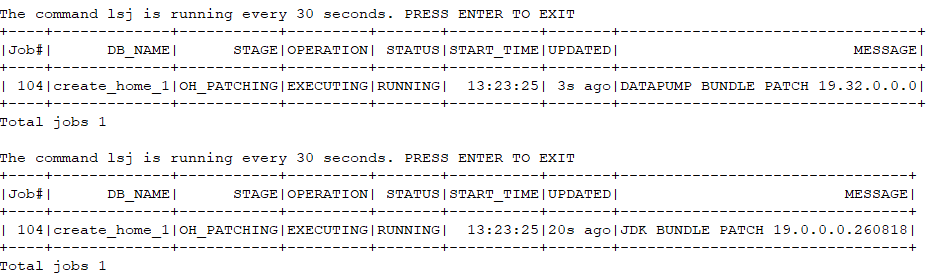
And this time it finished:
The command lsj is running every 30 seconds. PRESS ENTER TO EXITJob 104 completed------------------- Final Summary --------------------Number of databases [ 1 ]Jobs finished [1]Jobs failed [0]Jobs restored [0]Jobs pending [0]# Run the root.sh script as root for the following jobs:For create_home_1 -> /u01/app/oracle/product/19.0.0/dbhome_19_32/root.shPlease check the summary report at:/u01/Stage/autoupgrade/PATCHING_19.32/logs/cfgtoollogs/patch/auto/status/status.html/u01/Stage/autoupgrade/PATCHING_19.32/logs/cfgtoollogs/patch/auto/status/status.log[oracle@db-pri PATCHING_19.32]$ |
Job 104, one database, nothing failed. Note the job number has jumped again from 103, which is worth keeping track of if you ever need to go back and clear recovery data.
Don’t skip the root.sh line. AutoUpgrade can’t run it for you, so it hands it back and expects you to run it as root against the new home before you go any further.
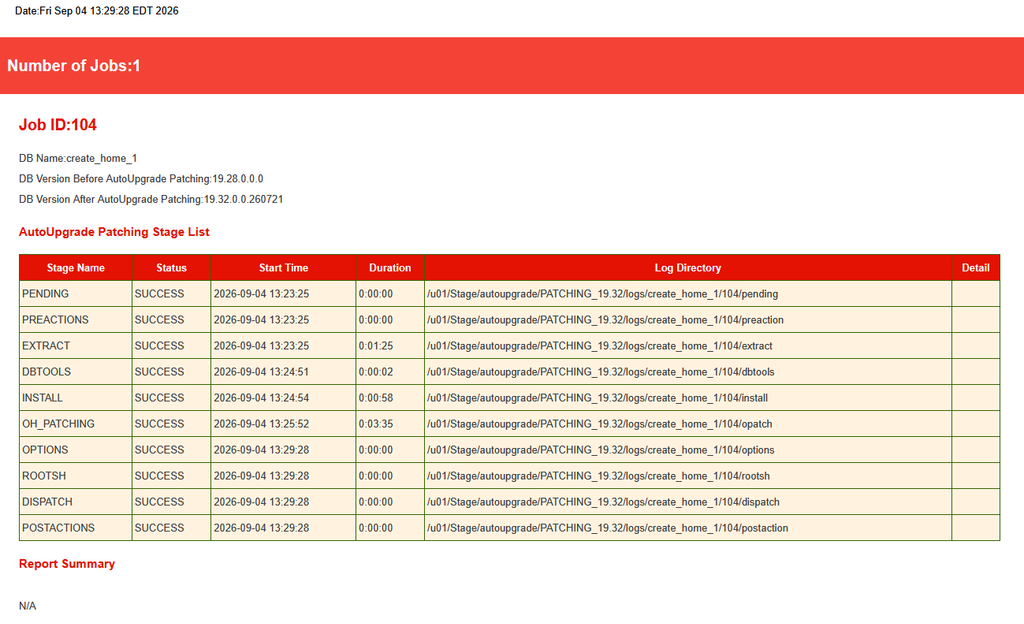
AutoUpgrade also writes a summary report in both HTML and plain text:
Here is the HTML output:
Step 9: Verify
You can validate patches by executing opatch lspatches.
|
|
Conclusion
AI has compressed the time everything takes, and that cuts both ways. The same leverage that lets us turn a morning’s work into minutes is sitting on the attacker’s desk too, which makes staying patched more important than ever. Oracle has changed the rhythm to match, adding monthly Critical Security Patch Updates in May 2026 on top of the quarterly CPUs. Keeping up with that by hand means downloading patches, staging them, working out conflicts and apply order, and I’ve lost enough hours to that to know I don’t want them back. AutoUpgrade pulls the whole set from My Oracle Support, installs out-of-place, and leaves the running database alone until you’re ready to switch. Yes, it broke on me, but over a missing Perl module on the host, not over anything AutoUpgrade did. Sort out your prerequisites, and the rest really is one command.