

- About

Getting to know us
- Industries
Industries
McMaster University: Exadata Cloud@Customer Case Study

Eclipsys has helped McMaster University maximize its investment in the Oracle Exadata Cloud@Customer solution. Read the story here
- Careers







Life at DSP-Eclipsys
- Contact Us
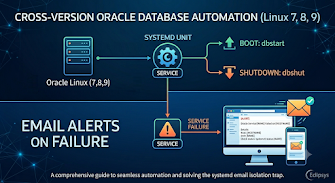
Cross-Version Oracle Database Automation on Oracle Linux
Contents
Introduction
In Oracle environments that do not use Oracle ASM, databases are not configured to start automatically after a server reboot. To automate database startup and shutdown, administrators commonly use Oracle's standard dbstart and dbshut utilities.
Although these tools provide basic automation, they do not always verify that the database has successfully reached the OPEN state, and they do not provide built-in notification when startup failures occur.
This blog demonstrates how to combine dbstart/dbshut, systemd, startup validation checks, and automated email alerts to create a reliable Oracle database auto-start framework. The approach is compatible with Oracle Linux 7, 8, and 9 and can be used with Oracle database versions that support the standard dbstart/dbshut utilities. It also includes a safe testing method for validating the email alert system without affecting a production database.
In this blog post, I design:
-
An Oracle auto-start service using systemd
-
Proper shutdown control
-
An email alert system for service failures
-
A safe test service to validate the alerting mechanism without production risk
This design is simple, stable, and suitable for Oracle Linux production environments.
Part 1: Oracle Database Auto Start Service (Production)
1.1. Creating oracle-db.service file
As the root user, create the file /etc/systemd/system/oracle-db.service and add the following content:
[Unit]Description=Oracle Database ServiceAfter=network-online.targetWants=network-online.target# Failure (important part)OnFailure=unit-status-mail@%n.service[Service]Type=oneshotUser=oracleGroup=oinstallWorkingDirectory=/u01/app/oracleRemainAfterExit=yes# Execute wrappersExecStart=/usr/local/bin/oracle-start.shExecStop=/usr/local/bin/oracle-stop.shTimeoutStartSec=10minTimeoutStopSec=10min[Install]WantedBy=multi-user.target |
The network-online.target dependency ensures that network services are available before Oracle startup begins. The OnFailure parameter triggers an email alert whenever the Oracle service fails, allowing administrators to be notified immediately.
The service runs as the Oracle software owner (oracle) and uses Type=oneshot because the startup script performs its work and exits. The RemainAfterExit=yes parameter keeps the service active after a successful startup.
Startup and shutdown operations are handled through dedicated wrapper scripts, making the configuration easier to maintain and troubleshoot.
The timeout and resource limit settings help ensure that Oracle has sufficient time and operating system resources to complete startup and shutdown operations successfully.
1.2. Oracle Startup Script (oracle-start.sh)
This script performs more than a standard dbstart operation. First, it checks whether the Oracle listener is already running and starts it only when required. This prevents unnecessary listener startup attempts during server reboot or service restart.
After the listener check, the script executes Oracle's native dbstart utility to start the database instance.
The most important part of the script is the validation loop. Instead of assuming that dbstart completed successfully, the script connects to the database using SQL*Plus and checks the instance status every 10 seconds. A startup is considered successful only when the database reaches the OPEN state.
If the database does not reach the OPEN state within 10 minutes, the script returns a failure code to systemd. This allows the OnFailure notification service to send an email alert and notify administrators that manual investigation may be required. The polling loop does not always wait for the full 10 minutes. If the database reaches the OPEN state earlier, the script exits immediately. The full 10-minute window only applies in failure or slow-start scenarios.
As the root user, create the startup script for the Oracle database /usr/local/bin/oracle-start.sh and add the following configuration:
|
|
1.3. Oracle Shutdown Script (oracle-stop.sh)
This script is used for safe shutdown of the Oracle database and listener, usually triggered by systemd during service stop or server shutdown.
First, we set ORACLE_HOME so Oracle commands can locate the database software. Then dbshut gracefully stops all database instances and closes active sessions in a clean way.
After that, lsnrctl stop stops the listener to prevent new connections. Finally, exit 0 tells systemd that shutdown completed successfully without errors.
As the root user, create the startup script for Oracle database /usr/local/bin/oracle-stop.sh and add the following configuration:
|
|
1.4. Set Script Permissions
After creating the startup and shutdown scripts, we need to set the correct ownership and permissions. This step is important because systemd runs the service using the oracle user, so the scripts must be accessible and executable by that user.
chown oracle:oinstall /usr/local/bin/oracle-start.sh /usr/local/bin/oracle-stop.shchmod 750 /usr/local/bin/oracle-start.sh /usr/local/bin/oracle-stop.sh |
Part 2: Systemd Email Alert System (Working Pipeline)
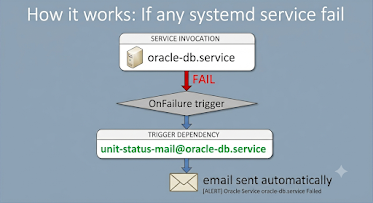
This part is responsible for sending an email notification when any systemd service fails. The main idea is very simple: when a service returns an error status, systemd automatically triggers another helper service that sends an email to the DBA or support team.
2.1. Email Template Unit
This unit is responsible only for calling the email script. The important part is %i, which means systemd will pass the failed service name dynamically into this unit. So we always know exactly which service has failed.
Also, Type=oneshot is used because this is not a long-running service; it just executes one action (send email) and finishes.
As the root user, create the file /etc/systemd/system/unit-status-mail@.service and add the following content:
|
|
2.2. Email Sending Script
This script takes the service name as input, then collects the system hostname and builds the email content.
The email contains:
-
Hostname of the server
-
Name of failed service
-
Commands to check service status
-
Commands to check logs
This is very helpful for the DBA team because they can directly see what command should be used for troubleshooting without guessing.
Finally, the script sends an email using mailx and logs the result in /tmp/systemd-mail.log for debugging purposes.
As the root user, create /usr/local/bin/send-systemd-alert.sh that actually sends an email and add the following content.
|
|
2.3. Systemd Failure Notification Workflow
When a service fails, systemd automatically triggers the action defined in the OnFailure parameter. In this configuration, the failed service name is passed to the unit-status-mail template service, which executes the email script and sends an alert notification to the configured recipient. This allows the DBA or support team to be notified immediately without manually checking service status or system logs.
3. Creating the Test Service
Since my production environment was already online and serving users, I could not test the Oracle auto-start service directly without introducing unnecessary risk. Therefore, I created a separate test service to validate the email notification framework safely.
3.1. oracle-db-test.service
The oracle-db-test.service unit is intentionally designed to be very similar to the production oracle-db.service. It uses the same Oracle user, service type, resource limits, and OnFailure configuration. This allows us to test the complete systemd alert workflow in an environment that closely matches production behavior.
As the root user, create the file /etc/systemd/system/oracle-db-test.service and add the following content.
3.2. Test Wrapper Script
The wrapper script is responsible for simulating Oracle service execution without making any changes to the database.
It performs a safe lsnrctl status check, which only verifies listener availability and does not start or stop any Oracle component. After a short delay to simulate a validation phase, the script intentionally returns a failure code.
Because systemd treats a non-zero return code as a service failure, the OnFailure action is triggered, and the email notification process starts automatically.
As the root user, create /usr/local/bin/oracle-db-test-wrapper.sh
|
|
3.3. Set Script Permissions
After creating the test wrapper script, set the correct ownership and permissions:
|
|
3.4. How to Test
Run the following commands:
systemctl daemon-reloadsystemctl start oracle-db-test.service |
systemctl daemon-reload instructs systemd to reload all unit files and recognize any new or modified service definitions.
systemctl start oracle-db-test.service starts the test service. The service is expected to fail intentionally, which triggers the OnFailure action and starts the email notification process.
If the alert email is received successfully, we can be confident that the notification framework is working correctly and is ready for use with the production Oracle service.
Conclusion
In this design, we successfully build:
-
Oracle automatic startup system using systemd
-
Safe shutdown handling
-
Reliable email alert system for failure
-
Production-mirror test service for validation
This architecture is stable because:
-
systemd handles service lifecycle
-
Oracle scripts handle database logic
-
The email system is fully separated and reusable
-
The test service allows safe validation without risk
This approach is very useful in real enterprise Oracle environments where downtime is critical, and testing must be safe.
For more information, check out our Oracle Database Solutions, or contact us today, and one of our experts will be in touch.