

- About

Getting to know us
- Industries
Industries
McMaster University: Exadata Cloud@Customer Case Study

Eclipsys has helped McMaster University maximize its investment in the Oracle Exadata Cloud@Customer solution. Read the story here
- Careers







Life at DSP-Eclipsys
- Contact Us
How to Resolve Oracle LogMiner SQL Reconstruction Issues During Table Structure Changes
Contents
Introduction
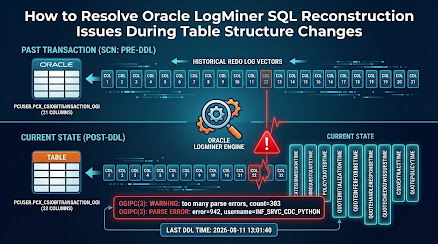
Last week, one of my clients experienced an issue with Oracle LogMiner after a table structure change. The generated SQL appeared to be incorrectly reconstructed, raising concerns about possible corruption in the LogMiner output.
Before looking at the incident, it is useful to understand what Oracle LogMiner does. LogMiner is an Oracle database utility allowing DBAs and applications to analyze redo and archived redo logs and reconstruct the database changes recorded in them. It is commonly used for troubleshooting, auditing, data recovery, and CDC (Change Data Capture) solutions.
In this case, the affected CDC environment used LogMiner to capture changes from the database. The problem appeared after a deployment modified the following table:
USER.TRANSACTION |
The table changed from 21 columns to 32 columns, with 11 new columns added.
The first important clue came from the Oracle alert log, which showed a significant increase in parsing errors around the same time:

The table's LAST_DDL_TIME was also:

These timestamps helped connect the application problem with the table structure change.
The investigation then focused on how LogMiner was obtaining its dictionary information and how it handled redo generated before and after the structural change. This ultimately led us to the root cause and the appropriate solution.
1. Root Cause
The investigation eventually identified the issue in the way the client's internal CDC utility was configuring Oracle LogMiner.
The CDC application uses a custom PL/SQL package:
C##CDCUSER.CDB_CDC_UTILS |
This is application code developed for the CDC solution. The first step was to determine how LogMiner was being configured by the CDC application. We searched the database source code for LogMiner dictionary options:
SELECT OWNER, NAME, TYPE, LINE, TEXTFROM DBA_SOURCEWHERE UPPER(TEXT) LIKE '%DICT_FROM_ONLINE_CATALOG%' OR UPPER(TEXT) LIKE '%DICT_FROM_REDO_LOGS%' OR UPPER(TEXT) LIKE '%DDL_DICT_TRACKING%'ORDER BY OWNER, NAME, LINE; |
The important result was:
OWNER NAME TYPE LINE TEXT----------- ---------------- ------------- ------ ----------------------------------------C##CDCUSER CDB_CDC_UTILS PACKAGE BODY 253 dbms_logmnr.start_logmnr(options => dbms_logmnr.dict_from_online_catalog |
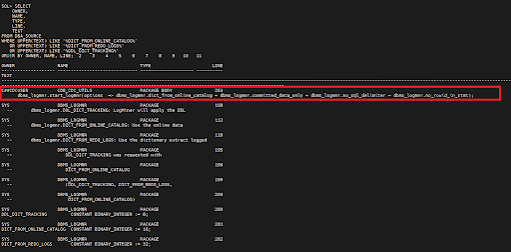
The package source therefore confirmed that the CDC application explicitly started LogMiner using DBMS_LOGMNR.DICT_FROM_ONLINE_CATALOG and did not request DBMS_LOGMNR.DICT_FROM_REDO_LOGS or DBMS_LOGMNR.DDL_DICT_TRACKING.
I also searched the source code for references to V$LOGMNR_CONTENTS:
SELECT OWNER, NAME, TYPE, LINE, TEXTFROM DBA_SOURCEWHERE UPPER(TEXT) LIKE '%V$LOGMNR_CONTENTS%'ORDER BY OWNER, NAME, LINE; |
This showed that C##CDCUSER.CDB_CDC_UTILS reads reconstructed SQL from V$LOGMNR_CONTENTS, including:
C##CDCUSER CDB_CDC_UTILS PACKAGE BODY 331 from v$logmnr_contents v |
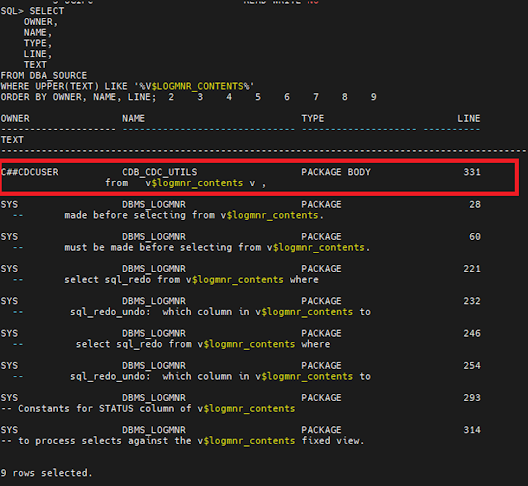
This is important because it establishes the complete flow inside the CDC application:
CDC application → CDB_CDC_UTILS → DBMS_LOGMNR.START_LOGMNR → V$LOGMNR_CONTENTS → reconstructed SQL_REDO
The combination of the package source, the table's DDL timestamp, and the LogMiner/alert-log errors provided evidence that the CDC application was using the current online catalog while processing redo associated with different table definitions.
The affected table had changed from 21 columns to 32 columns. Historical redo therefore corresponded to the earlier 21-column definition, while DICT_FROM_ONLINE_CATALOG caused LogMiner to use the current dictionary information.
This created a dictionary mismatch during SQL reconstruction after the table structure change.
The key finding was therefore not corruption of the archived redo logs. The issue was the CDC application's LogMiner dictionary configuration and how it handled DDL changes.
2. Solution and Validation
Before changing the CDC application's LogMiner configuration, the first step was to validate the database prerequisites and determine whether the required archived redo logs were available.
2.1. Verify Supplemental Logging and Database Version
Because the proposed LogMiner configuration uses a redo-based dictionary, the first check was to confirm that minimum supplemental logging was enabled.
The following query was executed:
SELECT SUPPLEMENTAL_LOG_DATA_MINFROM V$DATABASE; |

This confirmed that minimum supplemental logging was enabled.
The Oracle Database version was also verified:
SELECT *FROM V$VERSION; |
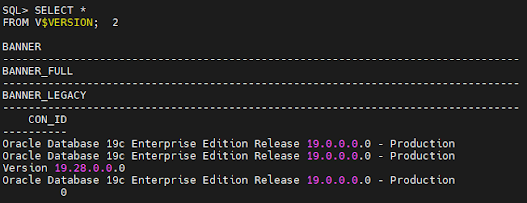
The relevant output showed:
Oracle Database 19c Enterprise Edition Release 19.0.0.0.0 - Production Version 19.28.0.0.0
Therefore, the database was running Oracle Database 19c Release 19.28.0.0.0 with minimum supplemental logging enabled.
2.2. Identify the Archived Redo Logs for the DDL Period
The table's LAST_DDL_TIME showed that the structure change occurred at 2026-08-11 13:01:40.
To identify the archived redo logs covering this period, the following query was used:
SELECT THREAD#, SEQUENCE#, FIRST_CHANGE#, NEXT_CHANGE#, FIRST_TIME, NEXT_TIME, NAMEFROM V$ARCHIVED_LOGWHERE FIRST_TIME >= TO_DATE( '11-AUG-2026 10:00:00', 'DD-MON-YYYY HH24:MI:SS' ) AND FIRST_TIME < TO_DATE( '12-AUG-2026 00:00:00', 'DD-MON-YYYY HH24:MI:SS' )ORDER BY THREAD#, SEQUENCE#; |
The archived-log history was then cross-checked with the most recently available archived logs:
SELECT THREAD#, SEQUENCE#, FIRST_CHANGE#, NEXT_CHANGE#, NAMEFROM V$ARCHIVED_LOGWHERE STANDBY_DEST = 'NO' AND NAME IS NOT NULLORDER BY THREAD#, SEQUENCE# DESCFETCH FIRST 20 ROWS ONLY; |
Based on these results, the required archived redo logs for the test were identified as sequences:
219170, 219171, 219172, 219173, 219174
This step was important because LogMiner cannot reconstruct the required transactions if there are gaps in the redo supplied to it.
2.3. Add the Archived Logs to LogMiner
The identified archived logs were then added to LogMiner in the CDB.
The first log was added with the NEW option, and the remaining logs were added to the same LogMiner session:
EXEC DBMS_LOGMNR.ADD_LOGFILE( LOGFILENAME => '/lun02/archives/COGIPC/1_219170_1119405242.dbf', OPTIONS => DBMS_LOGMNR.NEW);EXEC DBMS_LOGMNR.ADD_LOGFILE( LOGFILENAME => '/lun02/archives/Eclipsys/1_219171_1119405242.dbf');EXEC DBMS_LOGMNR.ADD_LOGFILE( LOGFILENAME => '/lun02/archives/Eclipsys/1_219172_1119405242.dbf');EXEC DBMS_LOGMNR.ADD_LOGFILE( LOGFILENAME => '/lun02/archives/Eclipsys/1_219173_1119405242.dbf');EXEC DBMS_LOGMNR.ADD_LOGFILE( LOGFILENAME => '/lun02/archives/Eclipsys/1_219174_1119405242.dbf'); |
2.4. Start LogMiner and Validate Redo Processing
For the initial validation, LogMiner was started using the same dictionary configuration currently used by the CDC application:
DBMS_LOGMNR.START_LOGMNR( OPTIONS => DBMS_LOGMNR.DICT_FROM_ONLINE_CATALOG + DBMS_LOGMNR.COMMITTED_DATA_ONLY + DBMS_LOGMNR.NO_SQL_DELIMITER + DBMS_LOGMNR.NO_ROWID_IN_STMT); |
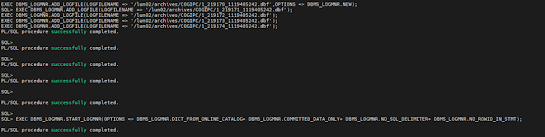
The purpose of this test was to determine whether LogMiner could successfully read and reconstruct the supplied redo for the affected period.
The volume of data processed was verified with:
SELECT COUNT(*)FROM V$LOGMNR_CONTENTS; |
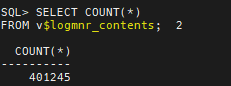
The query returned 401245 rows.
The operations reconstructed from the supplied redo included:
SELECT operation, COUNT(*)FROM V$LOGMNR_CONTENTSGroup By operationOrder By operation; |
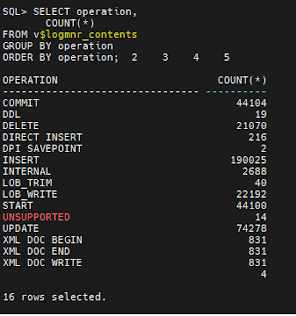
This confirmed that LogMiner was successfully reading and processing a significant volume of redo from the supplied archived logs.
2.5. Validate the Affected Table
The next step was to focus specifically on the affected table USER.TRANSACTION
The following query was used:
SELECT SCN, TIMESTAMP, OPERATION, SEG_OWNER, TABLE_NAME, USERNAME, SQL_REDO, SQL_UNDOFROM V$LOGMNR_CONTENTSWHERE SEG_OWNER = 'USER' AND TABLE_NAME = 'TRANSACTION'ORDER BY SCN; |
The query returned reconstructed SQL statements such as:

This was a particularly important observation. The reconstructed SQL contained the new columns introduced by the table structure change.
3. How to Prevent This Issue in the Future
The long-term fix is to update the LogMiner configuration in the client's CDC utility so dictionary information can be maintained across table structure changes.
3.1. Use a Redo-Based Dictionary with DDL Tracking in line 253.
Instead of starting LogMiner with DBMS_LOGMNR.DICT_FROM_ONLINE_CATALOG, the CDC utility should use DBMS_LOGMNR.DICT_FROM_REDO_LOGS + DBMS_LOGMNR.DDL_DICT_TRACKING
For example:
DBMS_LOGMNR.START_LOGMNR( OPTIONS => DBMS_LOGMNR.DICT_FROM_REDO_LOGS + DBMS_LOGMNR.DDL_DICT_TRACKING + DBMS_LOGMNR.COMMITTED_DATA_ONLY + DBMS_LOGMNR.NO_SQL_DELIMITER + DBMS_LOGMNR.NO_ROWID_IN_STMT); |
With this configuration, LogMiner can use dictionary information recorded in the redo stream and track dictionary changes associated with DDL operations. This is more appropriate for a CDC workload that needs to process redo across table structure changes.
Conclusion
This incident showed how a simple table structure change can expose issues in a CDC application's LogMiner configuration.
My investigation confirmed that the archived redo logs were intact and that LogMiner could reconstruct the SQL correctly when the required metadata was available. The root cause was traced to the custom CDC utility using DICT_FROM_ONLINE_CATALOG without enabling DDL_DICT_TRACKING.
For CDC environments that need to handle regular schema changes and DDL deployments, using DICT_FROM_REDO_LOGS together with DDL_DICT_TRACKING is a better approach. It helps LogMiner maintain the correct dictionary information as the table structure changes over time.
For more information, check out our Oracle Database Services, or contact us today, and one of our experts will be in touch.