

- About

Getting to know us
- Industries
Industries
McMaster University: Exadata Cloud@Customer Case Study

Eclipsys has helped McMaster University maximize its investment in the Oracle Exadata Cloud@Customer solution. Read the story here
- Careers







Life at DSP-Eclipsys
- Contact Us
Handling Let’s Encrypt TLS Client Auth Ending in OCI Certificate Automation
Contents
Introduction
Automating SSL certificate renewal is a common requirement in modern cloud environments, particularly when using short-lived certificates such as those issued by Let’s Encrypt. In our Oracle Cloud Infrastructure (OCI) deployment, we use Let’s Encrypt certificates to secure applications hosted behind an OCI Load Balancer.
To streamline certificate management and eliminate manual intervention, we implemented an automation workflow using Certify The Web, OpenSSL, and the Oracle Cloud Infrastructure CLI. Instead of relying solely on Certify The Web’s internal scheduler, certificate renewal is triggered programmatically through a PowerShell script. This script orchestrates the entire lifecycle—from initiating renewal to deploying the updated certificate in OCI.
Once renewal is triggered, the automation extracts the certificate components from the generated PFX file using OpenSSL, validates key certificate properties, and then uploads the certificate to the OCI Certificates Service using the OCI CLI. This ensures the certificate used by the OCI Load Balancer remains current without requiring manual updates.
During the implementation of this automation workflow, we encountered an unexpected issue while attempting to update an existing certificate in OCI. Despite the certificate being successfully renewed and validated, the update operation failed with the following error:
The certificate’s new extended key usages do not match the existing extended key usages.
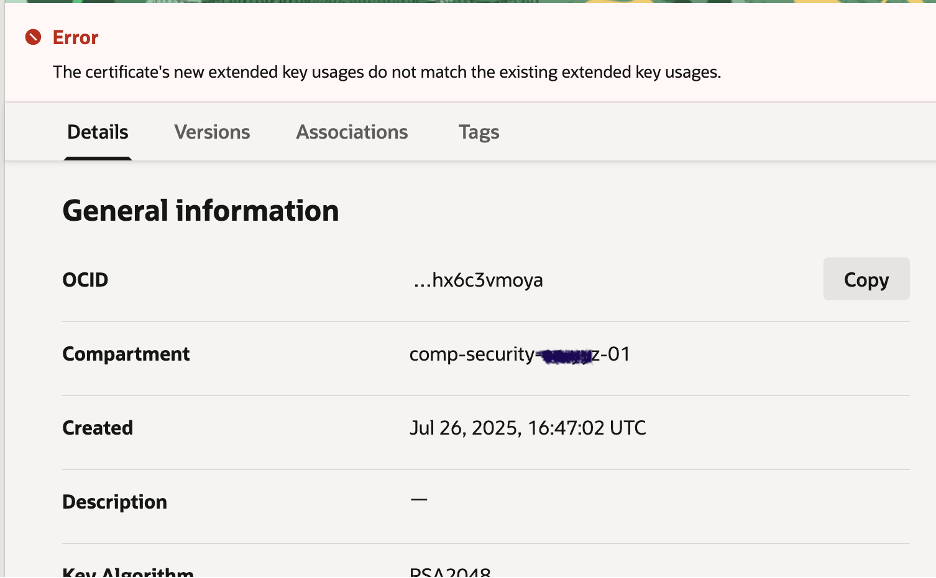
At first glance the certificate appeared valid, making the error difficult to interpret. This article walks through the investigation process, explains the root cause of the issue, and describes the correct approach when automating certificate updates in OCI.
Automation Workflow
Our SSL certificate renewal and update process consists of a few key steps:
-
Trigger Renewal – The script calls Certify The Web to renew the certificate.
-
Extract Components – Using OpenSSL, the PFX file is split into private key, public certificate, and intermediate/root chain.
-
Build Full Chain – Intermediate and root certificates are combined to form the full chain required by OCI.
-
Upload to OCI – The script uses the OCI CLI to update the existing certificate in OCI’s Certificates Service.
-
Restore Security – Any temporary changes, like opening port 80 for validation, are reverted.
This workflow ensures that certificate renewal is fully automated and reliable, reducing manual intervention and downtime.
Problem Encountered
While running the automation script, the certificate renewal itself completed successfully. However, when updating the OCI Certificates service via the CLI, an error occurred:
“The certificate’s new extended key usages do not match the existing extended key usages.”
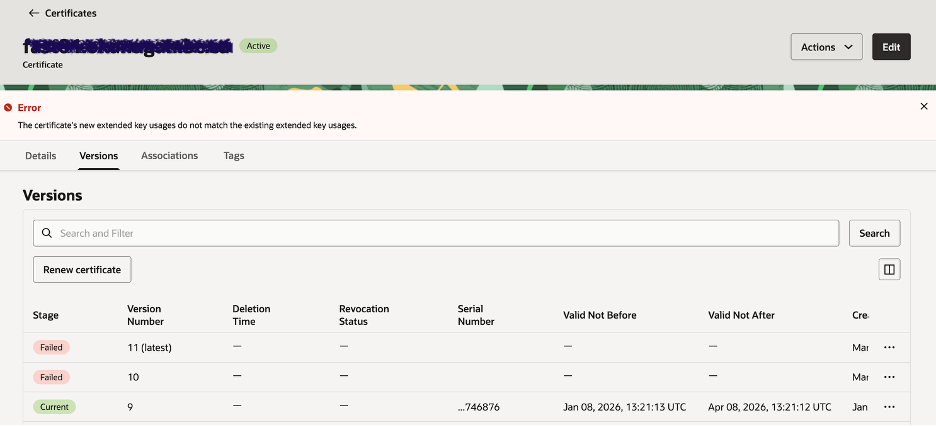
This happens because the existing OCI certificate included both “TLS Web Server Authentication” and “TLS Web Client Authentication” in its Extended Key Usage (EKU). The newly renewed certificate, generated via Certify The Web and Let’s Encrypt, contained only the server authentication EKU.
Since OCI validates that the new certificate matches the EKU of the original certificate, the mismatch caused the update to fail. This scenario highlights a common challenge when automating certificate updates: the renewed certificate’s attributes must be compatible with the original OCI certificate.
Root Cause & Analysis
The core reason this automation failed lies in a shift in how public certificate authorities issue certificates — most notably from Let’s Encrypt. Here’s what happened:
-
Existing OCI certificate was originally issued with two Extended Key Usages:
-
TLS Web Server Authentication
-
TLS Web Client Authentication
-
-
New certificate generated by Let’s Encrypt (via Certify The Web) only included:
-
TLS Web Server Authentication
-
OCI enforces that the Extended Key Usages (EKUs) of a certificate must match exactly when updating an existing certificate. Because the renewed certificate did not include the clientAuth EKU, OCI rejected the update.
This is not random — it reflects a recent policy change by Let’s Encrypt. Starting in 2026, Let’s Encrypt has removed the TLS Client Authentication EKU from the default certificates they issue.
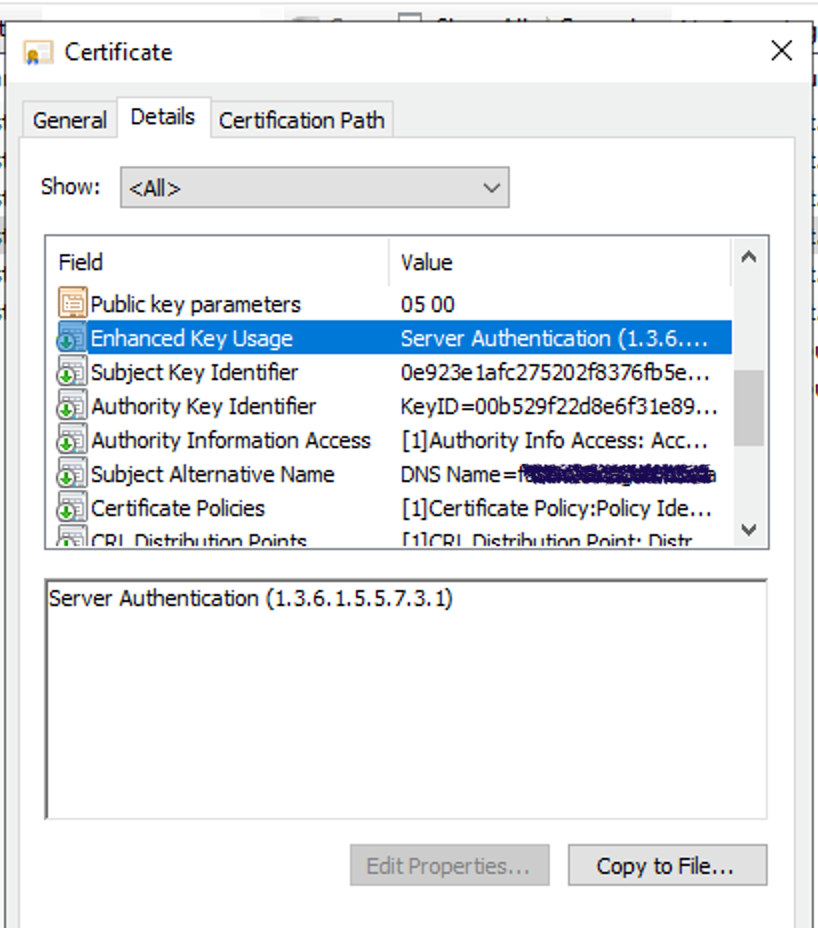
PS C:\MCSL\CertRenewal\output\PROD> & $OpenSSL x509 -in certificate.pem -text -noout | Select-String -Context 0,3 "Extended Key"
> X509v3 Extended Key Usage:
TLS Web Server Authentication
X509v3 Basic Constraints: critical
CA:FALSE
PS C:\MCSL\CertRenewal\output\PROD>
Whereas on previous certificate, we can see both Client and server authentication under “Enhanced key Usage”
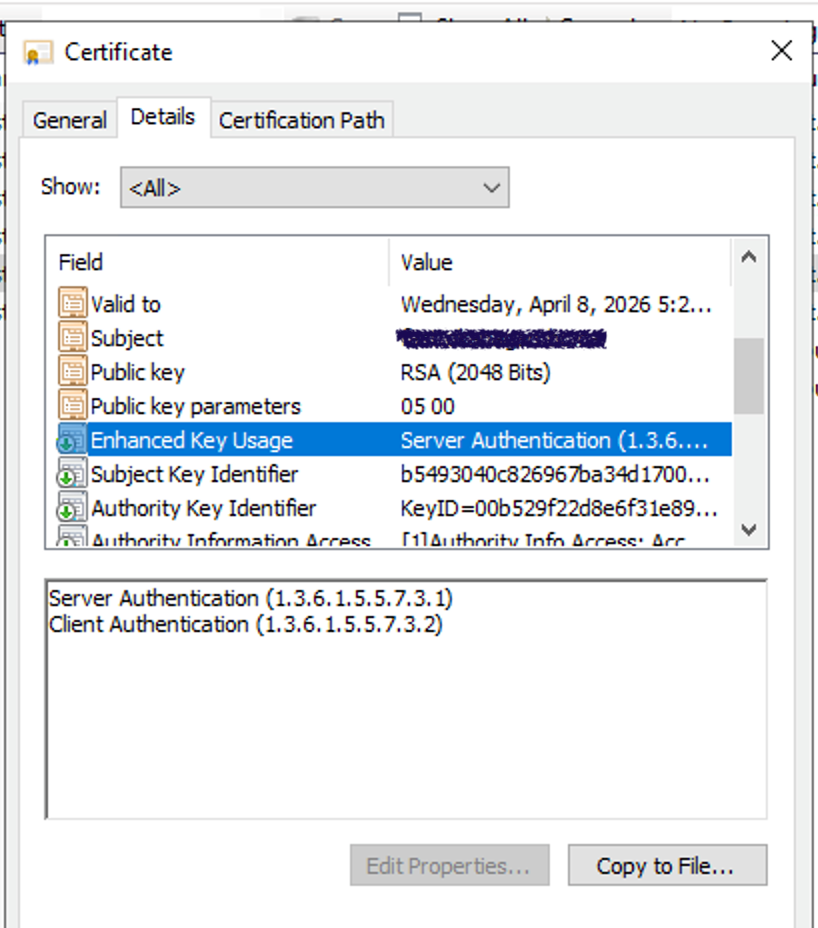
Let’s Encrypt explains that:
-
Historically, certificates included both server and client authentication EKUs.
-
Public certificates rarely need the clientAuth purpose.
-
Due to industry and browser root requirements, Let’s Encrypt will phase out clientAuth entirely from their default certificate profile.
Note: https://letsencrypt.org/2025/05/14/ending-tls-client-authentication
This change explains why the renewed certificate your automation produced only has server authentication — and not client — even if the original certificate did. Because OCI won’t accept a certificate with different EKUs during update, this mismatch prevented the automated update from succeeding.
Key points:
-
Certificates issued by Let’s Encrypt no longer include the Client Authentication EKU by default.
-
OCI requires EKUs to remain unchanged during certificate updates.
-
That EKU mismatch broke your automated update step.
Solution
To resolve the certificate renewal issue caused by mismatched Extended Key Usages (EKUs), we opted for a clean, one-time fix:
-
Create a new OCI Certificate Service
-
Generate a certificate with the required EKUs (e.g., TLS Web Server Authentication).
-
This ensures compatibility with the Load Balancer and the automation script.
-
-
Update the automation script
-
Replace the old certificate OCID with the new one in the PowerShell script.
-
This allows Certify The Web to continue renewing and preparing the certificate for OCI without errors.
-
-
Update the Load Balancer
-
Point the LB listener to the new certificate service.
-
This is a one-time operation, after which traffic will continue to be transmitted securely. Outcome: Future certificate renewals are fully automated, and the Load Balancer does not require additional updates. This approach minimizes operational overhead while ensuring secure traffic handling.
-
PS: please refer the below blog for automating Cert renewal.
https://sackville-tech.blogspot.com/2025/10/zero-click-cert-rotation-on-oracle.html