

- About

Getting to know us
- Industries
Industries
McMaster University: Exadata Cloud@Customer Case Study

Eclipsys has helped McMaster University maximize its investment in the Oracle Exadata Cloud@Customer solution. Read the story here
- Careers







Life at DSP-Eclipsys
- Contact Us
Simplifying Data Guard Configuration in Oracle Database 26ai
Contents
Introduction
We must experiment with AI as much as we can in this day and age. Even though AI occasionally causes hallucinations, it’s still critical to comprehend and apply it wisely in order to streamline and enhance our work. We can assess ourselves and advance into the next stage of our careers by embracing AI and discovering its potential.In light of this, it is worthwhile to concentrate on how businesses can use Oracle technologies to add AI capabilities to their databases.
For businesses that handle mission-critical data, the recent announcement that Oracle Database 26ai will be accessible for on-premises environments is genuinely revolutionary. This is a major advancement and a very clever move on the part of Oracle Corporation.
Not every company is prepared to transition to the cloud fully, and many Oracle environments manage extremely sensitive and crucial workloads. In my experience, a number of clients are still having trouble starting their cloud transformation journey because of operational issues, security limitations, or regulatory requirements.
Why Disaster Recovery Is More Important Than Ever
Organizations also need to be better equipped than ever to handle cybersecurity and disaster recovery (DR) issues. The development of AI tools has given cybercriminals access to more sophisticated capabilities, which facilitate the execution of complex attacks. DDoS attacks, data breaches, and automated hacking attempts are among the growing threats.
Strong security and disaster recovery (DR) plans are now necessary due to the constantly changing threat landscape. Ensuring business continuity and safeguarding sensitive data requires careful planning, robust security controls, and resilient architectures.
In this article, I will elaborate on the new commands introduced by Oracle to simplify Data Guard configuration.
Simplifying Data Guard Setup
Oracle is clearly moving toward greater simplicity and automation.
One feature I really like in Oracle Database 26ai is the introduction of the prepare commands:
PREPARE DATABASE FOR DATA GUARD
This command significantly reduces the manual steps traditionally required to configure a primary database for Data Guard.
With a single command, many prerequisite configurations are handled automatically, making the Data Guard setup process much easier and more efficient for DBAs.
What This Command Automatically Configures
These commands are executed through Data Guard Broker, and they automatically perform several important configuration tasks:
-
Automatically prepare the primary database for Data Guard configuration
-
Create Standby Redo Logs (SRL) if they are not already configured
-
Check whether the database is in ARCHIVELOG mode and enable it if necessary
-
Enable FORCE LOGGING to ensure redo data is properly generated for standby synchronization
-
Also, we can set the flashback recovery area
This automation greatly reduces complexity and minimizes configuration errors, making it much easier for DBAs to implement robust Disaster Recovery solutions.
Example: Preparing the Primary Database for Data Guard
Below is an example showing how to prepare a database for Data Guard using Data Guard Broker.
dgmgrl / as sysdba <<EOF
prepare database for data guard
with db_unique_name is ORCLCDB
db_recovery_file_dest is "/oradata/fast_recovery_area"
db_recovery_file_dest_size is 20g
restart;
exit;
EOF
Sample output:
[oracle@vbox fast_recovery_area]$ dgmgrl / as sysdba <<EOF
prepare database for data guard
with db_unique_name is ORCLCDB
db_recovery_file_dest is "/oradata/fast_recovery_area"
db_recovery_file_dest_size is 20g
restart;
exit;
EOF
DGMGRL for Linux: Release 23.26.1.0.0 - Production on Tue Mar 10 18:56:27 2026
Version 23.26.1.0.0
Copyright (c) 1982, 2026, Oracle and/or its affiliates. All rights reserved.
Welcome to DGMGRL, type "help" for information.
Connected to "ORCLCDB"
Connected as SYSDBA.
DGMGRL> > > > > Validating database "ORCLCDB" before executing the command.
Preparing database "ORCLCDB" for Data Guard.
Initialization parameter DB_FILES set to 1024.
Initialization parameter LOG_BUFFER set to 268435456.
Database must be restarted after setting static initialization parameters.
Database must be restarted to enable ARCHIVELOG mode.
Shutting down database "ORCLCDB".
Database closed.
Database dismounted.
ORACLE instance shut down.
Starting database "ORCLCDB" to mounted mode.
ORACLE instance started.
Database mounted.
Initialization parameter DB_LOST_WRITE_PROTECT set to 'TYPICAL'.
RMAN ARCHIVELOG deletion policy set to TO SHIPPED TO ALL STANDBY.
Initialization parameter DB_RECOVERY_FILE_DEST_SIZE set to '20g'.
Initialization parameter DB_RECOVERY_FILE_DEST set to '/oradata/fast_recovery_area'.
LOG_ARCHIVE_DEST_n initialization parameter already set for local archival.
Adding standby log group size 209715200 and assigning it to thread 1.
Adding standby log group size 209715200 and assigning it to thread 1.
Adding standby log group size 209715200 and assigning it to thread 1.
Initialization parameter STANDBY_FILE_MANAGEMENT set to 'AUTO'.
Initialization parameter DG_BROKER_START set to TRUE.
Force logging mode enabled.
ARCHIVELOG mode enabled.
Flashback Database enabled.
Database opened.
Succeeded.
DGMGRL> [oracle@vbox fast_recovery_area]$
Difference Between Traditional Data Guard Broker Configuration and Oracle 26ai
In earlier Oracle Database versions, configuring the Data Guard Broker required explicitly specifying the standby database type when adding a standby database to the configuration.
Traditional Data Guard Broker Configuration
In older versions, the standby database had to be defined with the MAINTAINED AS PHYSICAL clause when adding it to the configuration.
CREATE CONFIGURATION 'ORCLCDB' AS PRIMARY DATABASE IS 'ORCLCDB' CONNECT IDENTIFIER IS HLPROD_HLPR;
ADD DATABASE 'ORCLCDB_STBY' AS CONNECT IDENTIFIER IS ORCLCDB_STBY MAINTAINED AS PHYSICAL;
Oracle Database 26ai Data Guard Configuration
Oracle Database 26ai simplifies this process. The MAINTAINED AS PHYSICAL clause is no longer required when adding the standby database.
The configuration can now be completed with fewer commands:
DGMGRL> create configuration 'ORCLCDB' as primary database is 'ORCLCDB' connect identifier is ORCLCDB;
Connected to "ORCLCDB"
Configuration "ORCLCDB" created with primary database "ORCLCDB"
DGMGRL> add database 'ORCLCDB_STBY' as connect identifier is ORCLCDB_STBY;
Database "ORCLCDB_STBY" added
DGMGRL> enable configuration;
Error when you tried with old commands
DGMGRL> add database 'ORCLCDB_STBY' as connect identifier is ORCLCDB_STBY maintained as physical;
add database 'ORCLCDB_STBY' as connect identifier is ORCLCDB_STBY maintained as physical;
^
Syntax error before or at "maintained"
Wallet Configuration Requirement (21c and Above)
Starting from Oracle Database 21c and continuing in 26ai, the same SYS password must be used for wallet-based authentication. This simplifies connectivity and is a required step when configuring pluggable database environments.
mkstore -wrl $ORACLE_HOME/dbs/wallets/dgpdb -createCredential ORCLCDB 'sys'
Sample:
[oracle@vbox ~]$ mkstore -wrl $ORACLE_HOME/dbs/wallets/dgpdb -createCredential ORCLCDBS 'sys'
Oracle Secret Store Tool Release 23.0.0.0.0 - Production
Version 23.0.0.0.0
Copyright (c) 2004, 2026, Oracle and/or its affiliates. All rights reserved.
Your secret/Password is missing in the command line
Enter your secret/Password:
Re-enter your secret/Password:
Enter wallet password:
[oracle@vbox ~]$
Pluggable Standby Databases – A Game-Changing Feature
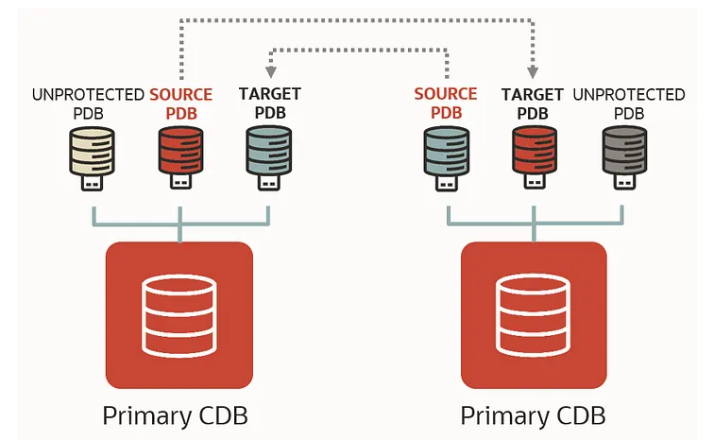
The introduction of pluggable standby databases is one of the major innovations. Organizations can prevent complete container database outages with Oracle Database 26ai’s support for protection at the pluggable database (PDB) level. Enhanced flexibility, targeted failover, and a notable increase in high availability are all provided by this capability. I’ll be writing a different piece to go into further detail about this feature.
Preparing for Pluggable Data Guard (DGPDB)
Oracle 26ai introduces simplified commands to prepare for pluggable Data Guard configurations:
DGMGRL> EDIT CONFIGURATION PREPARE DGPDB;
Enter password for DGPDB_INT account at ORCLCDB:
Enter password for DGPDB_INT account at ORCLCDBS:
Prepared Data Guard for Pluggable Database at ORCLCDBS.
Prepared Data Guard for Pluggable Database at ORCLCDB.
DGMGRL>
Conclusion
Oracle Database 26ai brings a new level of simplicity and automation to Data Guard configuration. The PREPARE DATABASE FOR DATA GUARD and EDIT CONFIGURATION PREPARE DGPDB commands streamline what was once a complex, error-prone process by automatically configuring essential parameters, enabling ARCHIVELOG and FORCE LOGGING modes, setting up standby redo logs, and preparing both primary and pluggable databases for broker management.
These enhancements not only reduce manual effort but also improve consistency, reliability, and high availability, allowing DBAs to implement robust disaster recovery solutions with confidence.
With pluggable standby database support, organizations can now achieve granular protection at the PDB level, preventing full container database outages and providing flexible, targeted failover options. Oracle 26ai makes it easier than ever to build resilient, secure, and efficient disaster recovery environments.
In a follow-up article, I will provide a detailed walkthrough of configuring pluggable standby databases, highlighting the practical benefits of this powerful new feature.