

- Success Stories
Success Stories
McMaster University: Exadata Cloud@Customer Case Study

Eclipsys has helped McMaster University maximize its investment in the Oracle Exadata Cloud@Customer solution. Read the story here
- Careers







Life at DSP-Eclipsys
- About

Getting to know us
- Contact Us
Pluggable Standby Databases in Oracle 26ai: Redefining Disaster Recovery and High Availability
Contents
Introduction
Data is valued like gold in this day and age. Engineers are being urged by numerous organizations to devote more time to AI projects. Businesses are attempting to optimize value, particularly with frameworks like MCP, as AI technologies and models are developing at a faster rate than ever before.
However, while focusing on AI, we shouldn’t overlook a critical foundation: database availability.
To truly benefit from AI, your data must be consistently available and protected. As more businesses move to the cloud, unexpected outages can still happen. On top of that, organizations regularly perform planned downtime activities, such as disaster recovery (DR) drills. This is where Oracle Data Guard continues to play a vital role by providing robust standby database capabilities and high availability.
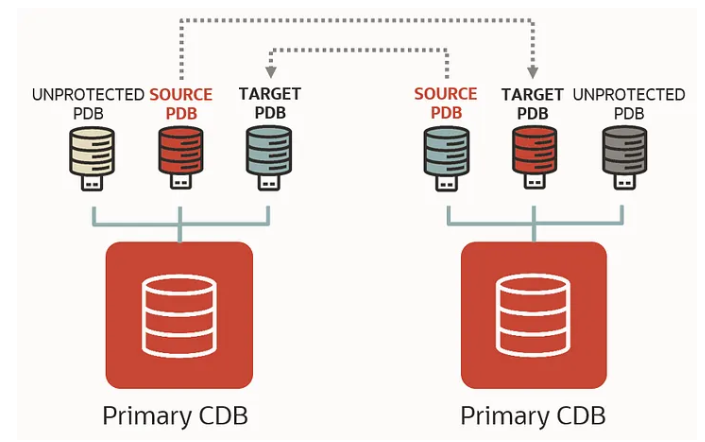
In recent releases, starting from Oracle 21c and continuing into 26ai, Oracle has significantly enhanced Data Guard, especially in the pluggable database (PDB) space. In older versions, Data Guard configurations were managed strictly at the Container Database (CDB) level. This meant everything was all-or-nothing.
Now, Oracle gives us the flexibility to run read-write PDBs alongside standby PDBs within the same container. This is a true game changer.
I’ve seen many organizations consolidating multiple pluggable databases into a single container for efficiency. But when it came to switchover or failover, there was no flexibility; you had to fail over the entire CDB, even if only one PDB was affected.
Up until now, standby databases have been used for moving read-only workflows or snapshot standby or active standby for reporting. However, this affects the entire CDB; with the new read-write CDB, you can also have standby and read-write pluggable databases on the standby site. That’s why I’m really excited about these new capabilities. Being able to work with pluggable standby databases gives organizations much more control. It allows them to design granular DR strategies and make better use of Oracle licensing and infrastructure.
This is a big step forward in helping organizations balance AI innovation with reliable, highly available database systems.
This is the Oracle documentation for the features of the 26ai DG broker: https://docs.oracle.com/en/database/oracle/oracle-database/26/dgbkr/scenarios-using-dgmgrl-dg-pdb-configuration-23c.html
There are also several important commands required to prepare pluggable databases (PDBs) for standby protection in a Data Guard configuration.
In this blog, I will demonstrate how to configure a standby pluggable database (PDB) using Oracle Data Guard Broker.
For detailed documentation and additional reference, you can refer to the following official Oracle resources:
-
Oracle Corporation Learn Tutorial: Data Guard per PDB
-
Oracle Data Guard Broker Scenario Guide: Configure Data Guard Protection for Source PDB
These guides provide step-by-step instructions and background concepts that complement the configuration covered in this article.
Architecture Overview:
-
Source: ORCLCDB (Primary for ORCLPDB1)
-
Target: ORCLCDBS (Standby for ORCLPDB_DG)
-
Goal: Protect ORCLPDB1 on ORCLCDB by replicating it to ORCLCDBS, while ORCLCDBS continues to host its own active PDBs.
Prerequisites
-
Ensure network connectivity between the source and target hosts (for example, using VCN peering in a cloud environment).
-
Two Oracle read-write database environments must be available (Oracle Database 26ai is required for full Data Guard PDB support).
-
A separate standby CDB is not required to configure Data Guard for a pluggable database (PDB).
Task 1: Prepare the Databases:
Perform the following steps on both the source (ORCLCDB) and target (ORCLCDBS) container databases to prepare them for Data Guard configuration.
Note: This is emphasized again because ORCLCDBS is also a read-write CDB and must be configured accordingly.
Example: Preparing the Primary Database for Data Guard
Below is an example showing how to prepare a database for Data Guard using Data Guard Broker.
dgmgrl / as sysdba <<EOF |
Sample output:
[oracle@vbox fast_recovery_area]$ dgmgrl / as sysdba <<EOFprepare database for data guard with db_unique_name is ORCLCDB db_recovery_file_dest is "/oradata/fast_recovery_area" db_recovery_file_dest_size is 20g restart;exit;EOFDGMGRL for Linux: Release 23.26.1.0.0 - Production on Tue Mar 10 18:56:27 2026Version 23.26.1.0.0Copyright (c) 1982, 2026, Oracle and/or its affiliates. All rights reserved.Welcome to DGMGRL, type "help" for information.Connected to "ORCLCDB"Connected as SYSDBA.DGMGRL> > > > > Validating database "ORCLCDB" before executing the command.Preparing database "ORCLCDB" for Data Guard.Initialization parameter DB_FILES set to 1024.Initialization parameter LOG_BUFFER set to 268435456.Database must be restarted after setting static initialization parameters.Database must be restarted to enable ARCHIVELOG mode.Shutting down database "ORCLCDB".Database closed.Database dismounted.ORACLE instance shut down.Starting database "ORCLCDB" to mounted mode.ORACLE instance started.Database mounted.Initialization parameter DB_LOST_WRITE_PROTECT set to 'TYPICAL'.RMAN ARCHIVELOG deletion policy set to TO SHIPPED TO ALL STANDBY.Initialization parameter DB_RECOVERY_FILE_DEST_SIZE set to '20g'.Initialization parameter DB_RECOVERY_FILE_DEST set to '/oradata/fast_recovery_area'.LOG_ARCHIVE_DEST_n initialization parameter already set for local archival.Adding standby log group size 209715200 and assigning it to thread 1.Adding standby log group size 209715200 and assigning it to thread 1.Adding standby log group size 209715200 and assigning it to thread 1.Initialization parameter STANDBY_FILE_MANAGEMENT set to 'AUTO'.Initialization parameter DG_BROKER_START set to TRUE.Force logging mode enabled.ARCHIVELOG mode enabled.Flashback Database enabled.Database opened.Succeeded.DGMGRL> [oracle@vbox fast_recovery_area]$ |
Wallet Configuration Requirement (21c and Above)
Starting from Oracle Database 21c and continuing in 26ai, the same SYS password must be used for wallet-based authentication. This simplifies connectivity and is a required step when configuring pluggable database environments.
First create wallet:
mkstore -wrl $ORACLE_HOME/dbs/wallets/dgpdb -create
Add sys credentials for easy access:
mkstore -wrl $ORACLE_HOME/dbs/wallets/dgpdb -createCredential ORCLCDB 'sys'
Sample:
[oracle@vbox ~]$ mkstore -wrl $ORACLE_HOME/dbs/wallets/dgpdb -createCredential ORCLCDBS 'sys'Oracle Secret Store Tool Release 23.0.0.0.0 - ProductionVersion 23.0.0.0.0Copyright (c) 2004, 2026, Oracle and/or its affiliates. All rights reserved.Your secret/Password is missing in the command lineEnter your secret/Password:Re-enter your secret/Password:Enter wallet password:[oracle@vbox ~]$ |
After adding both database list the credentials:
mkstore -wrl $ORACLE_HOME/dbs/wallets/dgpdb -listCredential
Some of the Data Guard configuration will fail unless we use a wallet to hold the credentials, allowing us to connect without having to specify credentials manually. Add a wallet location into the “sqlnet.ora” file on both nodes.
[oracle@db-pri admin]$ cat sqlnet.oraNAMES.DIRECTORY_PATH= (TNSNAMES, ONAMES, HOSTNAME)WALLET_LOCATION = (SOURCE = (METHOD = FILE) (METHOD_DATA = (DIRECTORY = /u01/app/oracle/product/26.0.0/dbhome_1/dbs/wallets/dgpdb) ))SQLNET.WALLET_OVERRIDE = TRUE[oracle@db-pri admin]$ |
Restart the listener on both nodes.
lsnrctl stoplsnrctl start
Configure Data Guard Broker
-- Node 01 - ORCLCDB dgmgrl /@ORCLCDB <<EOFcreate configuration ORCLCDB as primary database is ORCLCDB connect identifier is ORCLCDB;exit;EOF-- Node 02 - ORCLCDBS dgmgrl /@ORCLCDBSDGMGRL> create configuration ORCLCDBS as primary database is ORCLCDBS connect identifier is ORCLCDBS;Connected to "ORCLCDBS"Configuration "orclcdbs" created with primary database "orclcdbs"DGMGRL> |
Add the standby configuration to the source database configuration.
DGMGRL> add configuration ORCLCDBS connect identifier is ORCLCDBS;Configuration orclcdbs added.DGMGRL> |
Enable the configurations on both nodes
# Node 1dgmgrl /@ORCLCDB <<EOFenable configuration all;exit;EOF# Node 2dgmgrl /@ORCLCDBS <<EOFenable configuration all;exit;EOF |
Prepare the Databases for DG PDB
The Oracle Data Guard broker EDIT CONFIGURATION PREPARE DGPDB The command assumes that the source and target container database configurations are configured and enabled. Unlock and reset the password for the DGPDB_INT account for each of the container databases.
DG PDB Configuration
EDIT CONFIGURATION PREPARE DGPDB;
Sample output:
DGMGRL> EDIT CONFIGURATION PREPARE DGPDB;Enter password for DGPDB_INT account at ORCLCDB:Enter password for DGPDB_INT account at ORCLCDBS:Prepared Data Guard for Pluggable Database at ORCLCDBS.Prepared Data Guard for Pluggable Database at ORCLCDB.DGMGRL> |
Add the Standby PDB
In this step, you will create the standby version of ORCLPDB1 on the target container database ORCLCDBS.
Before proceeding, it’s important to review the current Data Guard configuration to understand the existing setup.
Execute the following commands to verify the configuration and PDB status:
-
SHOW CONFIGURATION; SHOW ALL PLUGGABLE DATABASE AT <Source>;
These commands will display the current Data Guard configuration along with the pluggable databases that are already part of the environment.
DGMGRL> show configuration;Configuration - ORCLCDB Protection Mode: MaxPerformance Members: ORCLCDB - Primary database ORCLCDBS - Primary database in orclcdbs configurationFast-Start Failover: DisabledConfiguration Status:SUCCESS (status updated 39 seconds ago)DGMGRL> SHOW ALL PLUGGABLE DATABASE AT ORCLCDB;PDB Name PDB ID Data Guard Role Data Guard PartnerORCLPDB1 3 None None |
Run this on the Source (ORCLCDB)
dgmgrl /@ORCLCDBDGMGRL> add pluggable database ORCLPDB_DG at ORCLCDBS source is ORCLPDB1 at ORCLCDB pdbfilenameconvert is "'/oradata/ORCLCDB/','/oradata/ORCLCDBS/'";Pluggable Database "ORCLPDB_DG" addedDGMGRL> |
Verify the PDB on Target (ORCLCDBS):
[oracle@vbox wallets]$ sqlplus / as sysdbaSQL*Plus: Release 23.26.1.0.0 - Production on Fri Mar 13 12:13:40 2026Version 23.26.1.0.0Copyright (c) 1982, 2025, Oracle. All rights reserved.Connected to:Oracle AI Database 26ai Enterprise Edition Release 23.26.1.0.0 - ProductionVersion 23.26.1.0.0SQL> show pdbs CON_ID CON_NAME OPEN MODE RESTRICTED---------- ------------------------------ ---------- ---------- 2 PDB$SEED READ ONLY NO 3 HR_PDB READ WRITE NO 4 ORCLPDB_DG MOUNTEDSQL> |
Instantiate the target PDB
The standby PDB currently does not contain any datafiles. These must be manually copied between the servers before proceeding. There are several methods available for this task, including RMAN datafile copies, the DBMS_FILE_TRANSFER package, and SCP.
In this example, we will use SCP to transfer the ORCLPDB1 datafiles to the appropriate location on the standby node for the ORCLPDB_DG database.
It’s recommended to execute begin backup before transferring the file using scp.
SQL> ALTER SESSION SET CONTAINER=ORCLPDB1; Session altered. SQL> ALTER DATABASE BEGIN BACKUP; Database altered. SQL> host scp -r /oradata/ORCLCDB/ORCLPDB1/* <oracle>@<orclcdbs-host>:/oradata/ORCLCDBS/ORCLPDB_DG SQL> ALTER DATABASE END BACKUP; Database altered. |
A separate article will be published detailing how to perform this process using RMAN, which is the preferred and most robust tool for backup and recovery operations.
-- target environment ORCLCDBSmkdir -p /oradata/ORCLCDBS/ORCLPDB_DG/-- SCP SQL> ALTER SESSION SET CONTAINER=ORCLPDB1;Session altered. SQL> ALTER DATABASE BEGIN BACKUP;Database altered. SQL> Host[oracle@db-pri ~]$ scp /oradata/ORCLCDB/ORCLPDB1/* oracle@192.168.56.102:/oradata/ORCLCDBS/ORCLPDB_DG/oracle@192.168.56.102's password:sysaux01.dbf 100% 450MB 27.0MB/s 00:16system01.dbf 100% 350MB 30.1MB/s 00:11temp01.dbf 100% 20MB 37.1MB/s 00:00undotbs01.dbf 100% 100MB 24.5MB/s 00:04users01.dbf 100% 7176KB 29.9MB/s 00:00SQL> ALTER DATABASE END BACKUP; Database altered. |
Update Datafile Paths in Control File
After copying the data files, you must update the datafile locations to reflect the correct path in the standby environment. This ensures the control file points to the correct physical files.
Use the following SQL to rename the datafiles:
SELECT 'alter database rename file ''' || name || ''' to ''/oradata/ORCLCDBS/ORCLPDB_DG/' || SUBSTR(name, INSTR(name, '/', -1) + 1) || ''';'FROM v$datafile;alter database rename file '/oradata/ORCLCDBS/ORCLPDB1/system01.dbf' to '/oradata/ORCLCDBS/ORCLPDB_DG/system01.dbf';alter database rename file '/oradata/ORCLCDBS/ORCLPDB1/sysaux01.dbf' to '/oradata/ORCLCDBS/ORCLPDB_DG/sysaux01.dbf';alter database rename file '/oradata/ORCLCDBS/ORCLPDB1/undotbs01.dbf' to '/oradata/ORCLCDBS/ORCLPDB_DG/undotbs01.dbf';alter database rename file '/oradata/ORCLCDBS/ORCLPDB1/users01.dbf' to '/oradata/ORCLCDBS/ORCLPDB_DG/users01.dbf'; |
Important Note: A separate article will cover how to perform this process using RMAN, which is the preferred and more robust approach for backup and recovery operations, especially in production environments.
As part of the standby configuration, you must create standby redo log (SRL) files on the target pluggable database (ORCLCDBS) to support real-time redo apply.
Validate Existing Online Redo Logs:
alter session set container=ORCLPDB_DG;-- validate redo logsSQL> select GROUP#, THREAD#, bytes/1024/1024, MEMBERS, STATUS from v$log; GROUP# THREAD# BYTES/1024/1024 MEMBERS STATUS---------- ---------- --------------- ---------- ---------------- 1 1 200 1 INACTIVE 2 1 200 1 INACTIVE 3 1 200 1 CURRENTSQL> |
Add Standby Redo Log Files
Create standby redo log groups with the same size as the online redo logs:
-- Add standby redo logsALTER DATABASE ADD STANDBY LOGFILE THREAD 1 GROUP 7 '/oradata/ORCLCDBS/ORCLPDB_DG/onlinelog/orclpdb_redo7.log' SIZE 200M;ALTER DATABASE ADD STANDBY LOGFILE THREAD 1 GROUP 8 '/oradata/ORCLCDBS/ORCLPDB_DG/onlinelog/orclpdb_redo8.log' SIZE 200M;ALTER DATABASE ADD STANDBY LOGFILE THREAD 1 GROUP 9 '/oradata/ORCLCDBS/ORCLPDB_DG/onlinelog/orclpdb_redo9.log' SIZE 200M;ALTER DATABASE ADD STANDBY LOGFILE THREAD 1 GROUP 10 '/oradata/ORCLCDBS/ORCLPDB_DG/onlinelog/orclpdb_redo10.log' SIZE 200M; |
Enable Redo Apply:
Start the apply process using DGMGRL:
dgmgrl /@ORCLCDB |
Validate the Apply process using dgmgrl:
DGMGRL> show pluggable database ORCLPDB_DG at ORCLCDBS;Pluggable database - ORCLPDB_DG at orclcdbs Data Guard Role: Physical Standby Con_ID: 4 Source: con_id 3 at ORCLCDB Transport Lag: 1 minute (computed 46 seconds ago) Apply Lag: 1 minute (computed 46 seconds ago) Intended State: APPLY-ON Apply State: Running Apply Instance: ORCLCDBS Average Apply Rate: 6 KByte/s Real Time Query: OFFPluggable Database Status:SUCCESSDGMGRL> |
Alter log sample:
rfs (PID:4402): Opened log for DBID:2998535517 B-1227474144.T-1.S-74.C-0 [krsr.c:19232]2026-03-31T14:27:50.652668-04:00ORCLPDB_DG(4):PR00 (PID:2937): Media Recovery Waiting for T-1.S-74 (in transit) [krsm.c:6590]2026-03-31T14:27:50.729242-04:00 rfs (PID:4402): Archived Log entry 61 added for B-1227474144.T-1.S-74 LOS:0x00000000007f9f00 NXS:0x00000000007f9f09 NAB:13 ID 0xb2b97f5d LAD:1 [krsp.c:951]2026-03-31T14:27:51.054274-04:00 rfs (PID:4420): Archived Log entry 62 added for B-1227474144.T-1.S-76 LOS:0x00000000007f9f11 NXS:0x00000000007f9f19 NAB:13 ID 0xb2b97f5d LAD:1 [krsp.c:951] rfs (PID:4420): No SRLs created [krsk.c:5077]2026-03-31T14:27:51.120102-04:00 rfs (PID:4398): Opened log for DBID:2998535517 B-1227474144.T-1.S-75.C-0 [krsr.c:19232]2026-03-31T14:27:51.137460-04:00 rfs (PID:4420): Opened log for DBID:2998535517 B-1227474144.T-1.S-77.C-0 [krsr.c:19232]2026-03-31T14:27:51.298411-04:00 rfs (PID:4398): Archived Log entry 63 added for B-1227474144.T-1.S-75 LOS:0x00000000007f9f09 NXS:0x00000000007f9f11 NAB:12 ID 0xb2b97f5d LAD:1 [krsp.c:951]2026-03-31T14:27:51.421800-04:00 rfs (PID:4420): Archived Log entry 64 added for B-1227474144.T-1.S-77 LOS:0x00000000007f9f19 NXS:0x00000000007f9f22 NAB:13 ID 0xb2b97f5d LAD:1 [krsp.c:951] rfs (PID:4420): No SRLs created [krsk.c:5077]2026-03-31T14:27:51.520192-04:00 rfs (PID:4420): Opened log for DBID:2998535517 B-1227474144.T-1.S-78.C-0 [krsr.c:19232]2026-03-31T14:27:51.941302-04:00ORCLPDB_DG(4):PR00 (PID:2937): Media Recovery Log /oradata/fast_recovery_area/ORCLCDBS/archivelog/2026_03_31/o1_mf_1_74_nwr4k6m4_.arc [krd.c:10255]2026-03-31T14:27:52.055915-04:00ORCLPDB_DG(4):PR00 (PID:2937): Media Recovery Log /oradata/fast_recovery_area/ORCLCDBS/archivelog/2026_03_31/o1_mf_1_75_nwr4k72r_.arc [krd.c:10255]2026-03-31T14:27:52.153743-04:00ORCLPDB_DG(4):PR00 (PID:2937): Media Recovery Log /oradata/fast_recovery_area/ORCLCDBS/archivelog/2026_03_31/o1_mf_1_76_nwr4k6l2_.arc [krd.c:10255]2026-03-31T14:27:52.261198-04:00ORCLPDB_DG(4):PR00 (PID:2937): Media Recovery Log /oradata/fast_recovery_area/ORCLCDBS/archivelog/2026_03_31/o1_mf_1_77_nwr4k73c_.arc [krd.c:10255]ORCLPDB_DG(4):PR00 (PID:2937): Media Recovery Waiting for T-1.S-78 (in transit) [krsm.c:6590] |
Validate Managed Recovery Process (MRP)
To verify that redo apply is functioning correctly on the standby database, you can query the Managed Recovery Process (MRP) status using the following SQL:
SELECT PROCESS, STATUS, SEQUENCE#, BLOCK# FROM V$MANAGED_STANDBY; SQL> /PROCESS STATUS SEQUENCE# BLOCK#--------- -------------------- ---------- ----------DGRD ALLOCATED 0 0DGRD ALLOCATED 0 0ARCH CONNECTED 0 0ARCH CONNECTED 0 0ARCH CONNECTED 0 0ARCH CLOSING 6 274433DGRD ALLOCATED 0 0MRP0 WAIT_FOR_LOG 78 0MRP0 ALLOCATED 0 0MRP0 ALLOCATED 0 0MRP0 ALLOCATED 0 0PROCESS STATUS SEQUENCE# BLOCK#--------- -------------------- ---------- ----------DGRD ALLOCATED 0 0DGRD ALLOCATED 0 0DGRD ALLOCATED 0 0DGRD ALLOCATED 0 0RFS IDLE 78 2RFS IDLE 0 0RFS IDLE 0 0RFS IDLE 0 0RFS IDLE 0 0 |
Sample Output: Read-Write and Standby Pluggable Databases
The following example demonstrates a container database hosting both a read-write PDB and a standby PDB within the same environment:
[oracle@vbox wallets]$ sqlplus / as sysdbaSQL*Plus: Release 23.26.1.0.0 - Production on Fri Mar 13 12:13:40 2026Version 23.26.1.0.0Copyright (c) 1982, 2025, Oracle. All rights reserved.Connected to:Oracle AI Database 26ai Enterprise Edition Release 23.26.1.0.0 - ProductionVersion 23.26.1.0.0SQL> show pdbs CON_ID CON_NAME OPEN MODE RESTRICTED---------- ------------------------------ ---------- ---------- 2 PDB$SEED READ ONLY NO 3 HR_PDB READ WRITE NO 4 ORCLPDB_DG MOUNTEDSQL> |
Conclusion
In today’s world, data is often referred to as the new gold. Organizations are attempting to absorb AI architecture and MCP protocols in order to maximize our data. As companies accelerate their adoption of AI and modern frameworks, there has never been a greater need for reliable, always-available data platforms. But only when the underlying data infrastructure is reliable, safe, and always available can AI reach its full potential.
While businesses are rapidly moving to the cloud and embracing innovation, challenges such as unexpected outages and planned activities like disaster recovery (DR) drills remain unavoidable. This is where Oracle Data Guard continues to prove its importance by delivering robust high availability and data protection capabilities.
With advancements introduced from Oracle Database 21c through to Oracle Database 26ai, Data Guard has evolved significantly, especially in the pluggable database (PDB) space. Previously, Data Guard operated strictly at the CDB level, forcing an all-or-nothing approach for switchover or failover scenarios.
Organizations can manage individual PDBs independently thanks to per-PDB Data Guard capabilities. This offers more granular control and lessens the overall business impact during failures by enabling read-write PDBs and standby PDBs to coexist within the same container database.
By combining workloads while preserving high availability, this method also helps businesses to create more effective and optimized licensing strategies, since Oracle Database licensing can be expensive. Contact us today to find out more.
In the next article, I will demonstrate how to perform pluggable database (PDB) switchover and failover using Oracle Data Guard Broker.